MoEngage × Oztix
The MoEngage × Oztix integration allows you to dynamically pull live event and ticket availability data from Oztix into your MoEngage campaigns via Content APIs. At send time, MoEngage calls the Oztix API with an event identifier, retrieves real-time ticket data, and inserts it directly into your message across email, push, SMS, in-app, and WhatsApp. Common use cases include alerting fans when tickets go on sale for an upcoming festival, surfacing real-time ticket availability to drive urgency in last-minute promotional sends, or personalising messages with venue, date, and pricing information for events in a user’s city or genre of interest.Integration
Step 1: Request Oztix API credentials
- Navigate to oztix.com.au/developers or oztix.com.au/contact/ and submit an access request. Provide details about your platform, intended use case, and the approximate volume of API calls you expect to make.
- Specify that your integration will be used for real-time event data fetching at campaign send time via a marketing automation platform. This helps Oztix understand your access pattern and assign the appropriate rate limits.
- Once approved, Oztix will issue you an OAuth access token or API key depending on your integration type. Retain this credential securely.
- Obtain the event IDs for the specific events you want to personalise campaigns around. Event IDs can be found in your Oztix organiser dashboard or retrieved from the Oztix team when your account is set up.
NoteA third party feature overview of the Oztix API is available at SportsFirst, which documents example endpoint patterns and response structures that can help you prepare your MoEngage configuration before your Oztix credentials arrive.
Step 2: Set up the Content API on MoEngage
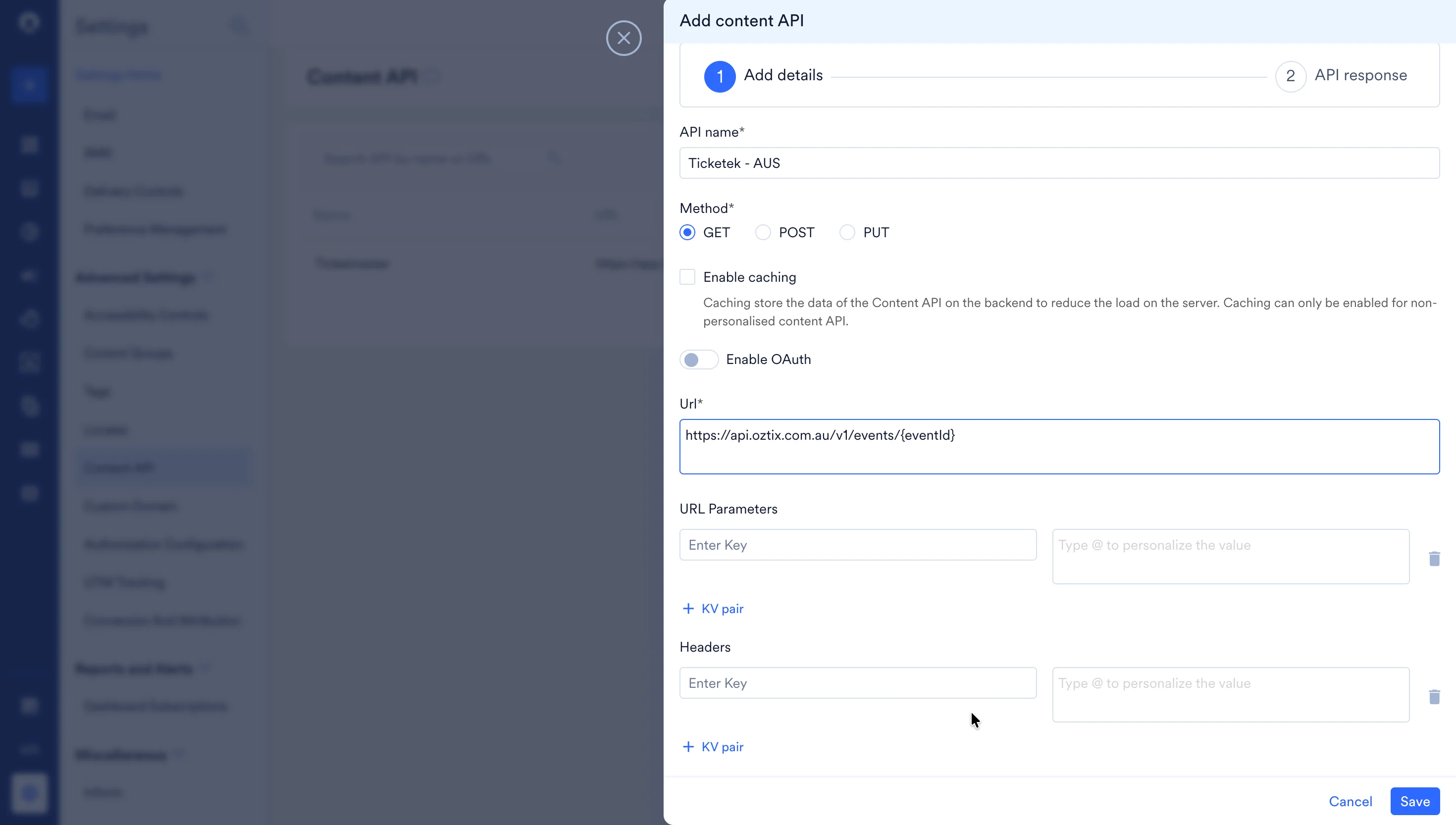
Once you have received your Oztix API credentials:- Navigate to Dashboard > Settings > APIs and open the Content API tab.
- Click Add Content API.
- Fill in the details using the table below as a reference.
| Key | Value | ||||||||
|---|---|---|---|---|---|---|---|---|---|
| Name | Choose a descriptive name, for example Oztix Event Details. This name will identify the API when you reference it inside campaign templates. | ||||||||
| Method | GET | ||||||||
| API URL | https://api.oztix.com.au/v1/events/{eventId}Replace {eventId} with the specific event identifier for the Oztix event you want to surface in your campaign. To fetch ticket availability specifically, use:https://api.oztix.com.au/v1/events/{eventId}/ticketsOztix will confirm the exact base URL and available endpoints for your account when they issue your credentials. | ||||||||
| Headers | Add the following headers to authenticate every request:
X-API-Key, or a query parameter. |
- Click Validate to confirm the platform returns a response, then click Save. The Content API is now available to reference inside any campaign across all supported channels.
Understanding the API response
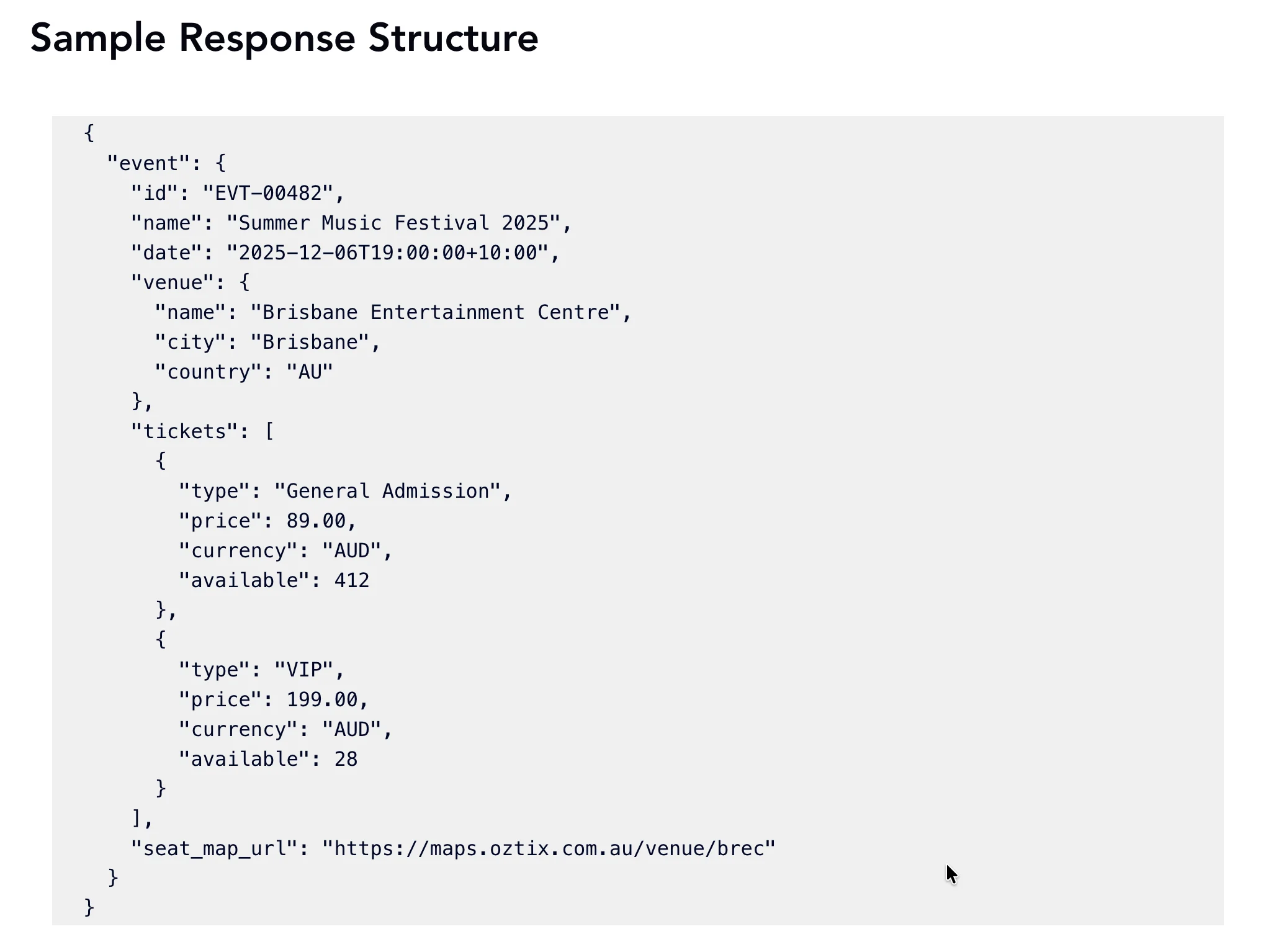
When MoEngage calls the Oztix API at send time, the response is a JSON object nested under anevent key. The fields most commonly referenced in campaign templates are shown below.
| Response field | Template variable example | Description |
|---|---|---|
event.name | {{ContentApi.event.name}} | The full name of the event, for example “Summer Music Festival 2025”. |
event.date | {{ContentApi.event.date}} | The event date and time in ISO 8601 format with timezone offset. |
event.venue.name | {{ContentApi.event.venue.name}} | The venue name where the event is taking place. |
event.venue.city | {{ContentApi.event.venue.city}} | The city where the event is taking place. |
event.tickets[0].type | {{ContentApi.event.tickets[0].type}} | The name of the first available ticket category, for example “General Admission”. |
event.tickets[0].price | {{ContentApi.event.tickets[0].price}} | The price of the first available ticket category in AUD. |
event.tickets[0].available | {{ContentApi.event.tickets[0].available}} | The number of tickets remaining in that category — useful for urgency messaging. |
event.seat_map_url | {{ContentApi.event.seat_map_url}} | A URL to the interactive seating map for the venue, usable as a link in email campaigns. |