

- Accurately measure ROI (Return on Investment) by closing the loop between digital ad spend and offline revenue.
- Optimize campaign bidding based on actual conversion data rather than clicks.
- Improve targeting by understanding which keywords and ads drive high-value offline actions.
PrerequisitesTo use this feature, you must have access to a Microsoft Advertising account with the required permissions.Note: Microsoft Advertising Offline Conversions is part of the Connected Channels add-on. Contact your dedicated MoEngage customer success manager (CSM) to enable it for your account.
Step 1: Connect Microsoft Advertising on the App Marketplace
To connect Microsoft Advertising on the App Marketplace, perform the following steps:- On the left navigation menu in the MoEngage UI, click App Marketplace.
- On the App Marketplace page, search for Microsoft Advertising Offline Conversions.
- Click the Microsoft Advertising Offline Conversions tile.
- On the Microsoft Advertising Offline Conversions page, go to the Integrate tab.
-
Enter the following details:
Field Required Description Connection name Yes The name of the Microsoft Advertising Offline Conversions connection. Developer Token Yes The developer token found in your Microsoft Advertising account under Tools > Developer settings. Customer ID Yes The unique Customer ID for your Microsoft Advertising account. Find this in the URL as cid. Account ID Yes The unique ID for the Microsoft Advertising account where conversions are recorded. Find this in the URL as aid. -
Click **Connect
 **You are taken to the Microsoft login page to authorize the account.
- You will be directed to the Microsoft login page to authorize your account.
-
Log in using an account with Administrator privileges to grant MoEngage the necessary permissions to establish the connection.
- Once authenticated, you will be automatically redirected back to the MoEngage dashboard.
Step 2: Create a Campaign to Sync Offline Conversions
After you configure the connector, send conversion events within a MoEngage campaign. To create a campaign to sync offline conversions, perform the following steps:- On the left navigation menu in the MoEngage UI, click Engage, and then click Campaigns.
- On the All campaigns page, click + Create campaign. The Create campaign dialog box appears.
- Under Connected Apps, click Microsoft Advertising Offline Conversions.
-
In the Content step of the campaign creation, map the MoEngage attributes to the following required Microsoft fields:
Field Required Description Goal Name Yes The name of the conversion goal as it appears in your Microsoft Advertising dashboard. This name must match exactly. Microsoft Click ID (MSCLKID) Optional The unique ID captured in the user profile when the user clicked your ad. Conversion Value Yes The monetary value of the conversion. Currency Code Yes The currency (for example, USD or EUR) that matches your Microsoft Advertising account settings. Attribution Model Optional The name of the attribution model used outside of Microsoft Advertising (for example, Linear, Time Decay, Position-based, or a custom model name). Attribution Credit Optional A decimal value between 0 and 1 (for example, 0.5 for 50 percent credit). This represents the fraction of the conversion assigned to this specific click. This field is only applicable if the goal is set to IsExternallyAttributed in Microsoft Advertising. 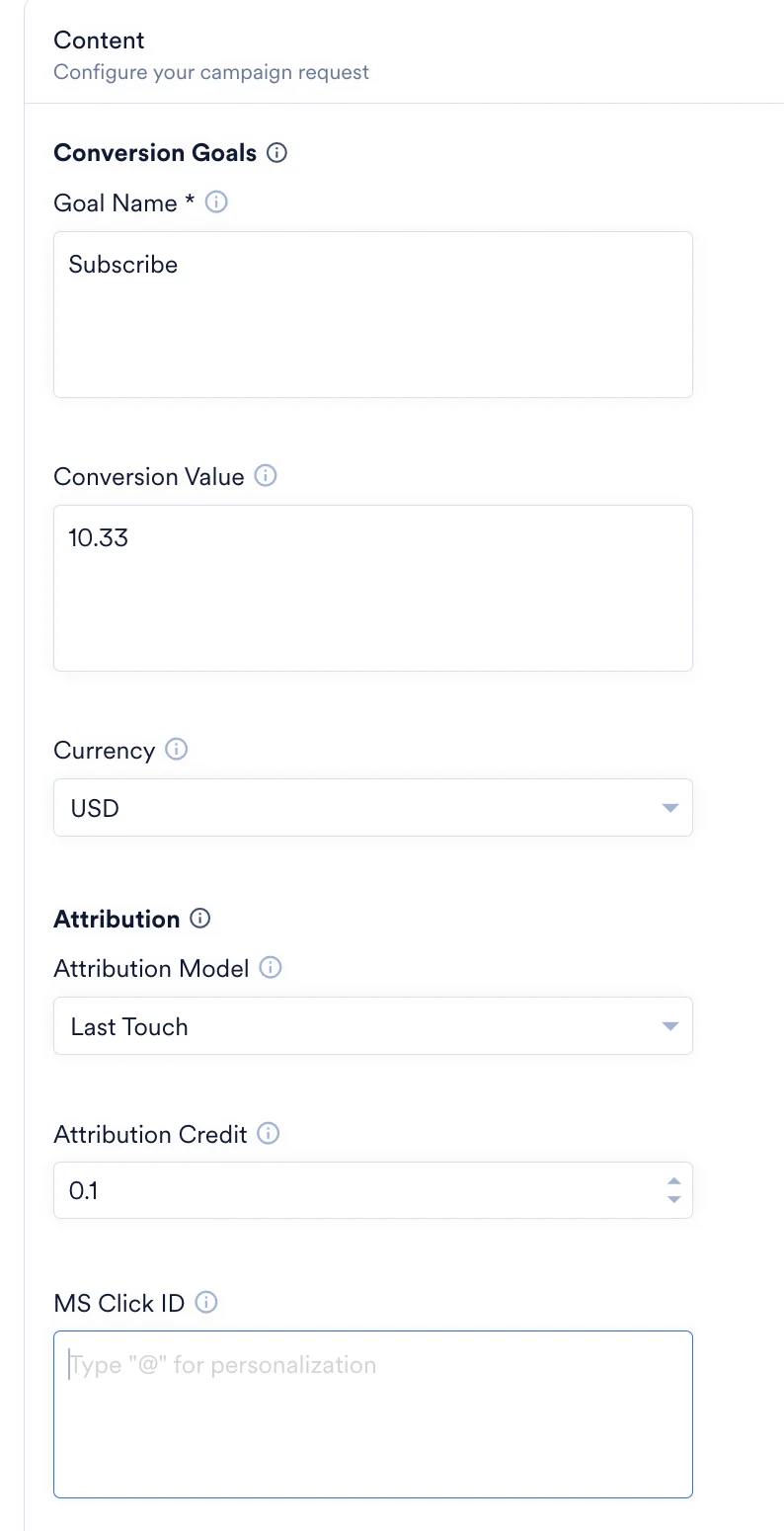
Information
- 90-day limit: Microsoft Advertising can only match transactions to clicks that occurred in the last 90 days.
- Clear naming: Because connections are account-specific, name your connectors clearly (for example, MSAds_US_Sales) to avoid confusion.
- Data Accuracy: Ensure that MSCLKID data is consistently captured and stored in user profiles to maximize match rates.
- Testing: Always run a test campaign before publishing to verify attribute mapping and conversion tracking.
- Account-Level Management: Maintain separate connectors for each Microsoft Advertising account to ensure proper attribution and currency handling.