After you launch a campaign, you need to know whether it actually drove the behavior you intended. Conversions are the key metric for this: they show the impact of your campaigns and whether you met your marketing objectives.Conversion attribution explains how a user reached a conversion goal — whether they saw your campaign, clicked it, and then completed the goal. For example, if your conversion goal is an Add to Cart event, attribution tells you when and how the user added the product: after seeing your push notification, after clicking it, or while already browsing in the app.MoEngage offers two attribution models:
All Interactions Model — credits every campaign whose attribution window was active when the user converted.
Last Interaction Model — credits only the campaign with the deepest and most recent user interaction.
The attribution model (All Interactions or Last Interaction) and the conversion view are configured once for the whole workspace under Settings → Advanced settings → Conversion and attribution. The attribution window is set separately for each campaign and conversion goal during campaign creation. For more information, see Campaign Attribution Settings.
Use the following table to decide which model fits your reporting needs.
I want to…
Use this model
See every campaign that contributed to a conversion
All Interactions Model
Understand the full journey that led to a conversion
All Interactions Model
Attribute each conversion to exactly one campaign
Last Interaction Model
Run multiple campaigns with the same conversion goal at the same time
Last Interaction Model (avoids double-counting)
Compare ROI for a single, most-impactful campaign
Last Interaction Model
Attribute conversions that start on one platform and finish on another
Last Interaction Model
Changing the attribution model recalculates your historical conversion and revenue numbers. Because the model is a workspace-level setting that applies to all campaigns and Flows, switching it recalculates conversion statistics for past campaigns. Moving from All Interactions to Last Interaction can cause a dip in some campaigns’ conversion and revenue metrics, and moving the other way can inflate them. For more information, see Switching Between Attribution Models.
The attribution window is the duration for which MoEngage tracks a conversion goal for a user, starting from when they receive or click a communication from a campaign or Flow. It applies to both attribution models. You set it per campaign and per goal during campaign creation. For more information, see Attribution Window.The maximum attribution window depends on the channel:
Channel
Maximum Attribution Window
Push
36 hours
In-App
36 hours
On-site Message (OSM)
36 hours
Cards
36 hours
Connectors
36 hours
SMS
10 days
Email
10 days
WhatsApp
10 days
Flows
10 days
The minimum attribution window is 1 hour for all channels and Flows.
The All Interactions Model attributes a conversion to every campaign that contributed to it within the configured timeframe. It credits all the interactions a user had with your campaigns before converting.
Attribution Type
Description
View-through conversion
The user completed the goal within the attribution window after receiving the campaign. No click is required.
Click-through conversion
The user completed the goal within the attribution window after clicking the campaign. This is click-based tracking.
In-session conversion
The user completed the goal within 30 minutes of clicking the campaign. This is in-session tracking.
The All Interactions Model can attribute a single conversion to more than one campaign. When campaigns share a conversion goal and their attribution windows overlap, the same conversion is credited to each of them, so the total conversions reported across campaigns can exceed the number of conversions that actually occurred. To get one-to-one attribution, use the Last Interaction Model or schedule your campaigns so their attribution windows do not overlap.
These examples show how attribution works for individual campaigns.Example 1 — A user adds an item to the cart after receiving two campaignsYou send a user two campaigns, both with the conversion goal of adding a Deal of the Day item to the cart, and both with a 20-hour attribution window:
A Push campaign (C1) about the latest offers.
An In-app campaign (C2) with a Deal of the Day banner.
You send the push (C1) at 7 PM on Day 1, and the in-app message (C2) is shown around 8 AM on Day 2.
The user adds an item to the cart at
Conversion Attribution
10 PM on Day 1
Push (C1) only. The conversion falls inside C1’s window (7 PM Day 1 – 3 PM Day 2). C2 has not been shown yet.
9 AM on Day 2
Push (C1) and In-app (C2). The conversion falls inside both C1’s window (7 PM Day 1 – 3 PM Day 2) and C2’s window (8 AM Day 2 – 4 AM Day 3).
8 PM on Day 2
In-app (C2) only. C1’s window has expired; the conversion falls inside C2’s window (8 AM Day 2 – 4 AM Day 3).
Example 2 — A user views a product page after receiving campaigns on different channelsYou send three campaigns, all with the conversion goal of viewing the deals webpage:
Push (C1), 36-hour window.
WhatsApp (C3), 18-hour window.
Email (C2), 20-hour window.
You send Push (C1) at 11 PM on Day 1, WhatsApp (C3) at 8 AM on Day 2, and Email (C2) at 11 AM on Day 2.
The user views the product page at
Conversion Attribution
6 AM on Day 2
Push (C1) only. Inside C1’s window (11 PM Day 1 – 11 AM Day 3). C2 and C3 have not been sent yet.
9 AM on Day 2
Push (C1) and WhatsApp (C3). Inside C1’s window and C3’s window (8 AM Day 2 – 2 AM Day 3). C2 has not been sent yet.
9:30 AM on Day 3
Push (C1) only. C2’s window (11 AM Day 2 – 7 AM Day 3) and C3’s window (8 AM Day 2 – 2 AM Day 3) have both expired. The conversion is still inside C1’s window.
These examples show how attribution works for Flows.Example 1 — A user purchases a product after receiving communications from a FlowYou configure an onboarding Flow (F1) on a retail platform, with the conversion goal of purchasing a product:
On entry, a Welcome Notification is sent via a Push campaign (C1).
After 2 hours, a Welcome Email is sent via an Email campaign (C2).
After 24 hours, MoEngage checks whether the user has purchased. If not, a nudge is sent via a WhatsApp campaign (C3).
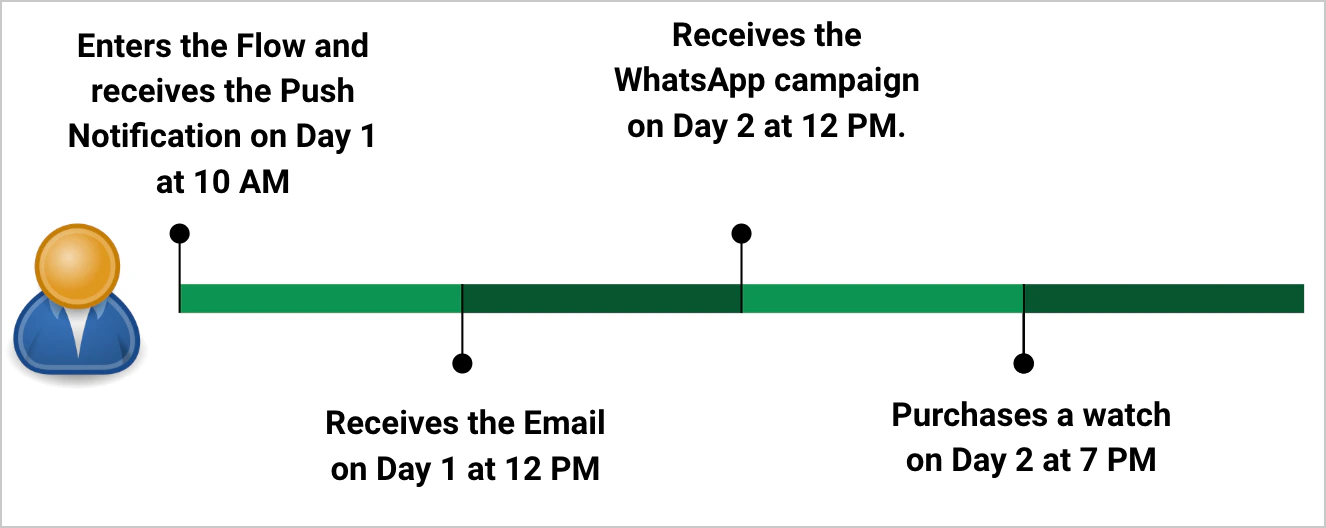
John enters the Flow and receives the push (C1) on Day 1 at 10 AM, receives the email (C2) on Day 1 at 12 PM, has not purchased by Day 2 at 12 PM so he receives the WhatsApp message (C3), and finally buys a watch on Day 2 at 7 PM.If the Flow’s attribution window is 1 day:
The conversion is attributed to Flow F1 and to the WhatsApp campaign only.
The Converted Trips metric for the Flow is incremented by one.
The Conversion and Conversion Events metrics for the WhatsApp campaign are each incremented by one.
If the Flow’s attribution window is 2 days:
The conversion is attributed to the Flow and to each point campaign in it (Push, Email, and WhatsApp).
The Converted Trips metric for the Flow is incremented by one.
The Conversion and Conversion Events metrics for each campaign are each incremented by one.
For more information, see Conversion Attribution in Flows.Example 2 — A user subscribes to a newsletter after receiving campaigns from two FlowsYou run two Flows that share the conversion goal of subscribing to the newsletter:
The user completes the goal within both Flows’ attribution windows, so the conversion is attributed to both F1 and F2:
The Converted Trips metric for each Flow is incremented by one.
The Conversion metric for each campaign in both Flows (In-app and Push from F1; Email and Push from F2) is incremented by one.
The Conversion Events metric for each of those campaigns is incremented by one.
This example shows attribution when a campaign and a Flow share the same conversion goal.You configure a Flow (F1) for an EdTech app to promote a new tutorial, with the conversion goal of viewing the tutorial and a 3-day (72-hour) attribution window:
On entry, a New Tutorial Added notification is sent via a Push campaign (C1).
After 24 hours, if the user has not viewed the tutorial, an Email campaign (C2) nudges them.
After 36 hours, the system checks again. If the tutorial is still unviewed, an SMS campaign (C3) nudges them.
You also run two independent campaigns with the same conversion goal, each with a 30-hour window:
A Push campaign (C4) on Day 2.
An SMS campaign (C5) on Day 3.
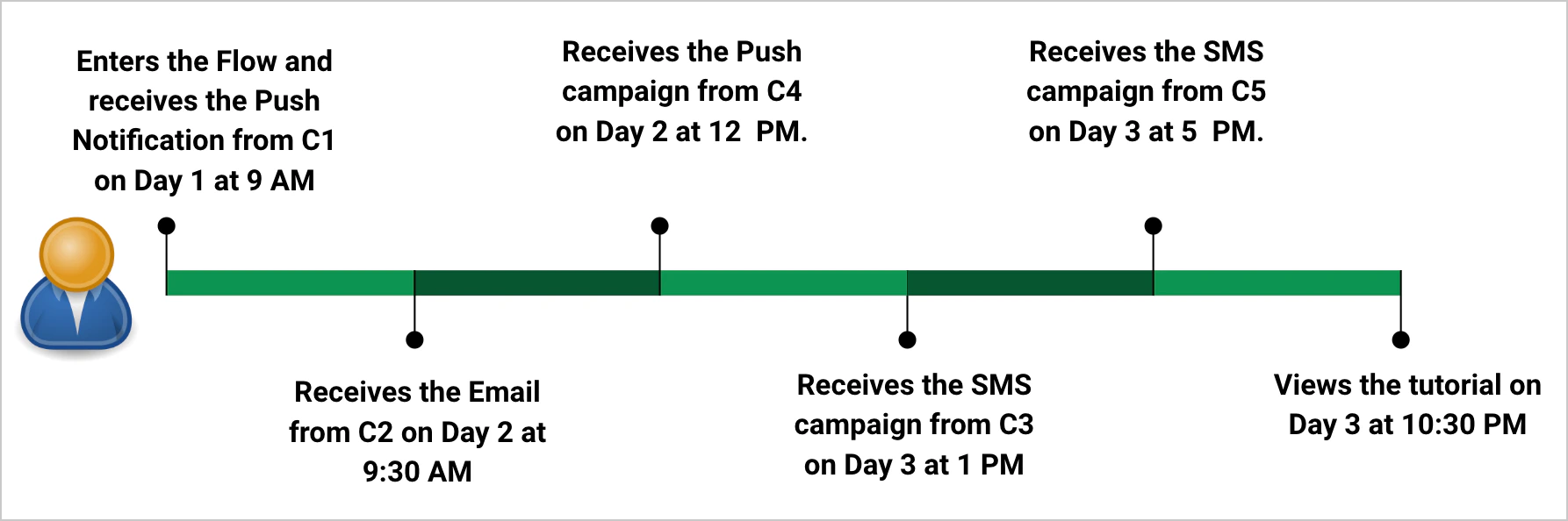
John enters the Flow and receives Push C1 on Day 1 at 9 AM, Email C2 on Day 2 at 9:30 AM, Push C4 on Day 2 at 12 PM, SMS C3 on Day 3 at 1 PM (because he still has not viewed the tutorial), and SMS C5 on Day 3 at 5 PM. He views the tutorial on Day 3 at 10:30 PM.The conversion is attributed to Flow F1, to all the campaigns within the Flow (Push, Email, and SMS), and to the independent SMS campaign C5:
The Converted Trips metric for the Flow is incremented by one.
The Conversion and Conversion Events metrics for the in-Flow Push, Email, and SMS campaigns, and for SMS campaign C5, are each incremented by one.
The independent Push campaign C4 is not attributed: its 30-hour window (Day 2, 12 PM – Day 3, 6 PM) had already expired by the time the tutorial was viewed at 10:30 PM on Day 3.For more information, see Conversion Attribution in Flows.
The Last Interaction Model attributes a conversion to the campaign with the user’s deepest and most recent interaction. It is useful when you run multiple campaigns with the same conversion goal at the same time and need to identify the single most effective one.Consider a user who receives a push notification and converts within the attribution window:
If they convert without clicking the notification, it is a view-through conversion.
If they click the notification first, it is a click-through conversion.
Priority order: Clicks > Views > Sends. The deeper interaction always wins. If two campaigns have the same interaction depth, the most recent interaction wins.
Attribution Type
Description
Total conversions
The sum of all conversions, including click-based, view-based, and cross-platform conversions.
Click-through conversion
The number of goals completed by users who clicked the campaign within the attribution window. This is click-based tracking.
MoEngage ranks the events that lead to a conversion as follows:
Campaign clicks (highest priority): The user shows clear intent by acting on the communication. Clicking a push notification, SMS, WhatsApp message, In-App message, On-site message, or Card and then converting is the highest-priority interaction.
Campaign views / impressions (medium priority): The user has seen the campaign but not acted on it. Receiving a push notification, opening an email, reading a WhatsApp message, or seeing an In-App message, OSM, or Card counts as a view.
Campaign sends (lowest priority): The campaign was only delivered; the user may not have noticed or acted on it. A push, SMS, email, WhatsApp message, or Card that was merely sent counts as a send.
Attribution is decided first by the deepest interaction, then by the latest interaction. A deeper interaction wins regardless of how recent the others were — for example, a click outranks a more recent view.Example: An SMS campaign (C1) and an Email campaign (C2) share a conversion goal and each has a 2-day attribution window. John clicks the SMS (C1) on Day 1 at 2 PM, opens the email (C2) on Day 2 at 10 AM, and adds a product to his cart on Day 2 at 10 PM. The conversion is attributed to the SMS campaign (C1): even though the email had the more recent interaction (an open), the SMS had the deeper one (a click).
Conversion Attribution in Campaigns
Conversion Attribution in Flows
Campaigns and Flows Together
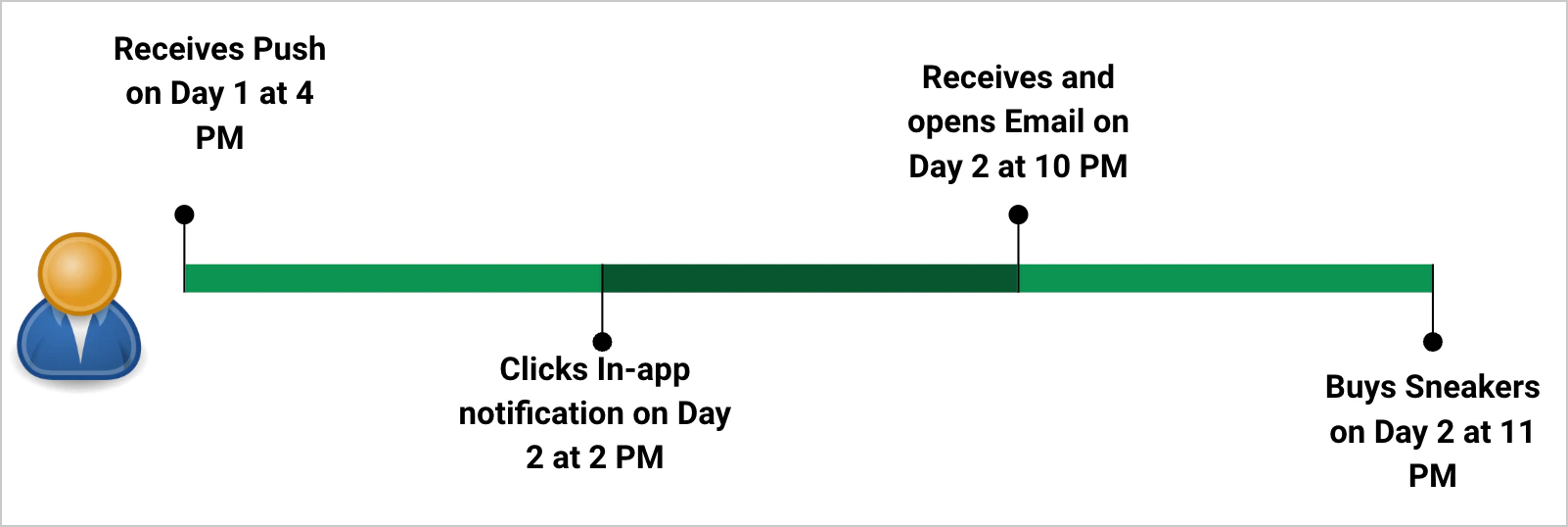
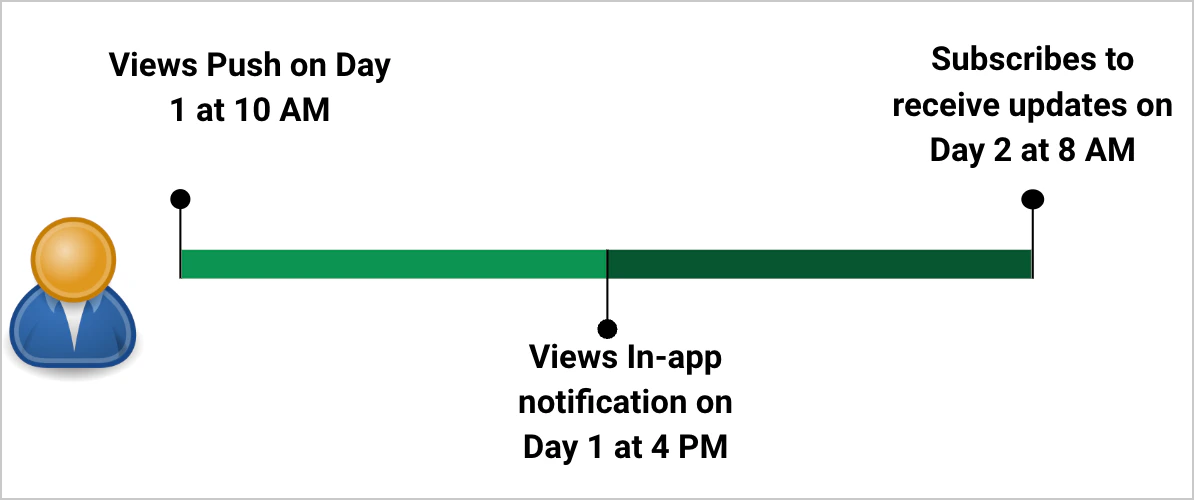
Example 1 — A user purchases after interacting with several campaignsA Push campaign, an Email campaign, and an In-app campaign all share the conversion goal of a product purchase and have a 36-hour window. John receives the push on Day 1 at 4 PM, clicks the in-app message on Day 2 at 2 PM, receives and opens the email on Day 2 at 10 PM, and buys a pair of sneakers on Day 2 at 11 PM.John’s deepest interaction is the in-app click. The attribution priority is In-app (Click) > Email (View) > Push (View), so the conversion is attributed to the In-app campaign.Example 2 — A user subscribes after receiving two campaignsA Push campaign and an In-app campaign share the conversion goal of a subscription and have a 24-hour window. John views the push on Day 1 at 10 AM, views the in-app message on Day 1 at 4 PM, and subscribes on Day 2 at 8 AM.Both interactions are views, so they have the same depth. MoEngage then uses the latest interaction, which was the in-app message, so the conversion is attributed to it.Example 3 — A user in the Control Group for two campaigns convertsA Push campaign and an SMS campaign both send flight-cancellation information, share the conversion goal of viewing the train-info webpage, each have a 5% Control Group, and a 36-hour window. John falls into the Control Group for both, so he receives neither campaign. If he then views the train-cancellation information, he is treated as converted, and the campaign that ran most recently receives the attribution. For example, if the SMS campaign ran after the Push campaign, the conversion is attributed to the SMS campaign.
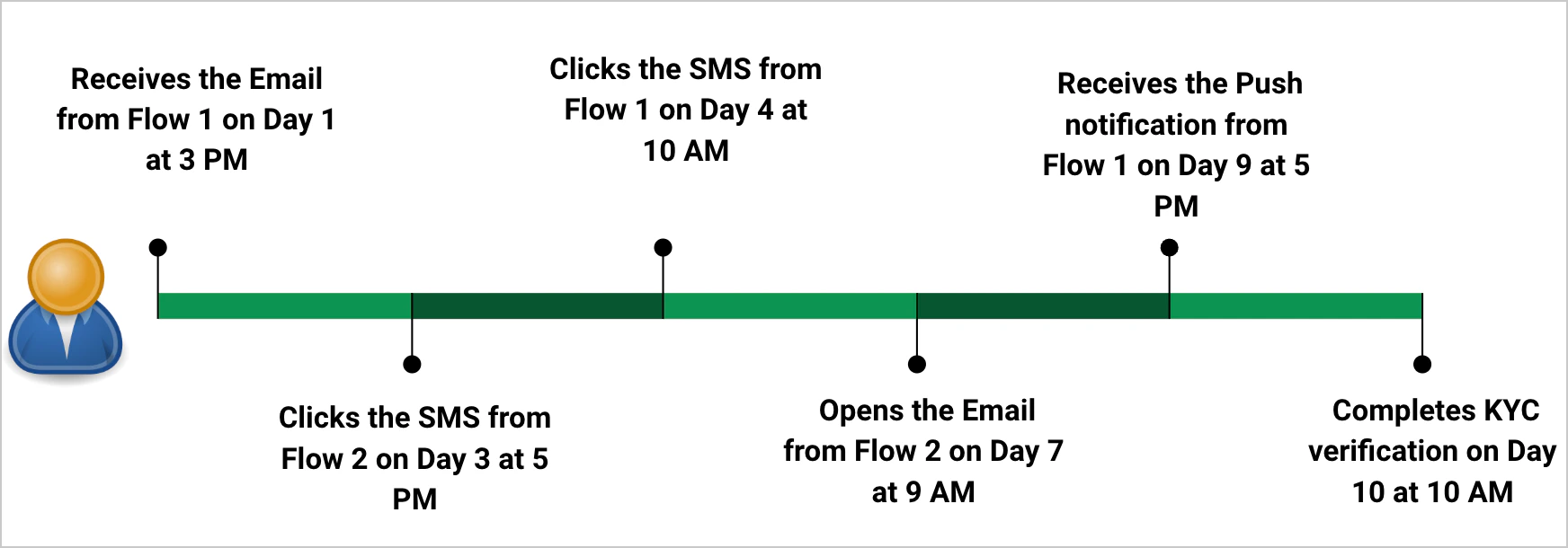
Example — A user completes KYC after communications from two FlowsA bank runs two Flows in parallel, both sharing the conversion goal of KYC Completion with a 10-day window:
Flow 1 onboards new customers and prompts them to complete KYC.
Flow 2 manages KYC completion for existing customers due to compliance requirements.
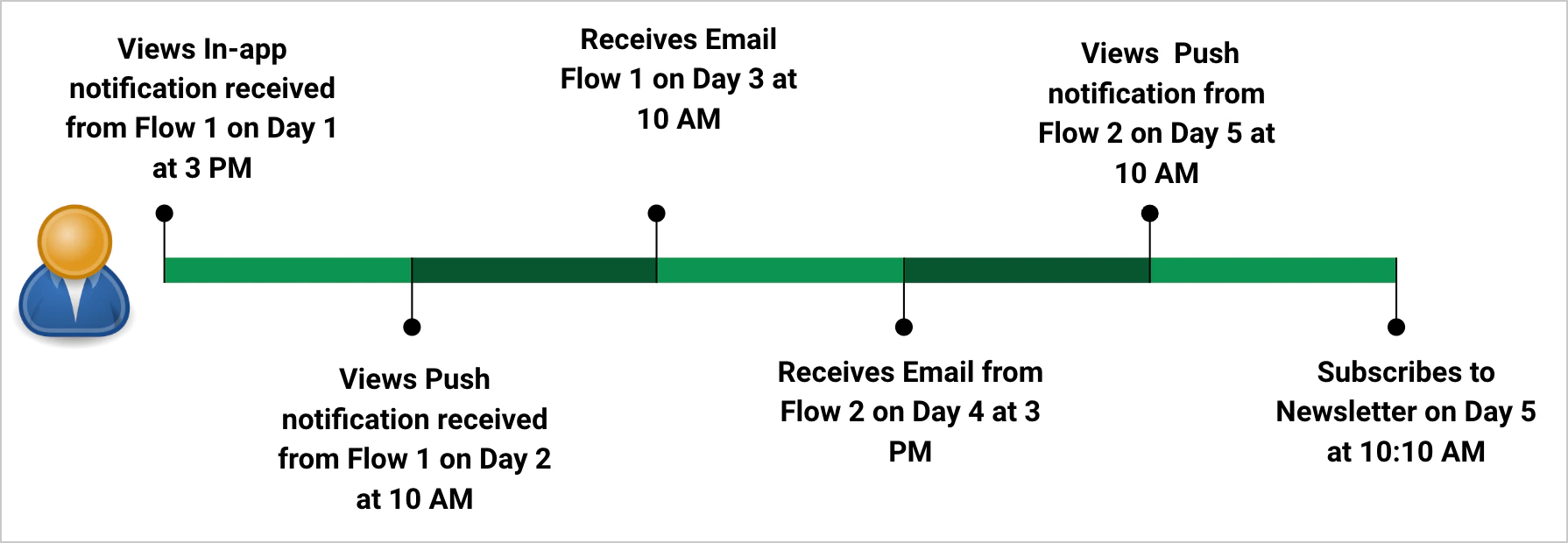
John signs up for a new credit card and, as an existing customer whose last verification was three years ago, qualifies for both Flows. He receives the Email from Flow 1 on Day 1 at 3 PM; the SMS from Flow 2 on Day 3 at 5 PM, which he clicks; the SMS from Flow 1 on Day 4 at 10 AM, which he clicks; the Email from Flow 2 on Day 7 at 9 AM, which he opens; the Push from Flow 1 on Day 9 at 5 PM; and completes his KYC on Day 10 at 10 AM.
Flow
Deepest Interaction
Onboarding Flow (Flow 1)
SMS (Click) > Email (Receive) > Push (Receive)
KYC Completion Flow (Flow 2)
SMS (Click) > Email (Open)
Flow 1 vs Flow 2
Both have an SMS click, so the interaction depth is equal. MoEngage then uses the latest interaction.
Both Flows have an SMS click (equal depth), so MoEngage compares recency. John’s SMS click for Flow 1 (Day 4, 10 AM) is more recent than his SMS click for Flow 2 (Day 3, 5 PM). The conversion is therefore attributed to Flow 1:
The Converted Trips metric for Flow 1 is incremented by one.
The Conversion and Conversion Events metrics for the SMS campaign in Flow 1 are each incremented by one.
This example uses the same setup as the All Interactions “Campaigns and Flows Together” example, but evaluated under the Last Interaction Model.A Flow (F1) for an EdTech app promotes a new tutorial (conversion goal: view the tutorial; 72-hour window) with Push (C1), Email (C2), and SMS (C3) steps. Two independent campaigns — Push (C4) and SMS (C5), each with a 30-hour window — share the goal.John receives Push C1 on Day 1 at 9 AM, Email C2 on Day 2 at 9:30 AM, Push C4 on Day 2 at 12 PM, SMS C3 on Day 3 at 1 PM, and SMS C5 on Day 3 at 5 PM, then views the tutorial on Day 3 at 10:30 PM.Every interaction is a view, so all have the same depth. MoEngage uses the latest interaction, which is SMS campaign C5 on Day 3 at 5 PM — the closest to the tutorial view at 10:30 PM. The conversion is attributed to SMS campaign C5.
A user may receive a campaign on one platform and complete the conversion goal on another — for example, receiving a push notification on Android and then making the purchase on the web.Example: A Push campaign for Android customers promotes flight deals, with the conversion goal of a flight-ticket purchase and a 24-hour window. John views the push on his Android device on Day 1 at 8 AM, then buys a ticket on a webpage he was redirected to from the app on Day 1 at 10 PM.How the two models handle this:
All Interactions Model: If the purchase event is sent from the web platform and no web campaign with the same conversion goal is running, the conversion is not attributed to any campaign.
Last Interaction Model: The conversion is attributed to the Push campaign, because it was the last interaction — regardless of the platform on which the conversion event fired.
Because the All Interactions Model can drop cross-platform conversions in this way, the Last Interaction Model is generally better suited to businesses with cross-platform user journeys.
Revenue Tracking is an optional feature tied to a campaign’s primary conversion goal. To enable it, turn on the Revenue performance toggle for the primary goal during campaign creation. For more information, see Tracking Revenue Metrics.When Revenue Tracking is enabled, the following metrics appear on the Campaign Analytics page:
Total Campaign Revenue — the sum of the order value across all conversion events attributed to the campaign.
Average Order Value — Total Campaign Revenue ÷ Number of Conversions.
Average Revenue Per User — Total Revenue ÷ Number of Unique Conversions.
How Revenue Is Calculated for Object Array Attributes
When the revenue attribute selected for a conversion goal is part of an object array, MoEngage sums the value of that attribute across all objects in the array — it does not isolate the value from the specific object that matches your conversion event’s filter condition.Example:
If your conversion event is Purchase where product.name = Orange, and you set total_amount as the revenue attribute, MoEngage does not pick just the value (100) tied to Orange. It sums every value found for total_amount in the payload:100 + 200 + 150 = 350This happens because there’s no link between the conversion goal’s filter condition and the specific object the revenue value belongs to — MoEngage picks up every occurrence of the selected attribute in the array and totals it, regardless of which record it came from.Revenue metrics are tracked for all attribution types. To view a specific one, use the Attribution Type filter in the top-right corner of the Campaign Analytics page.
In the All Interactions Model, if a conversion is attributed to multiple campaigns with overlapping attribution windows, the revenue is added to every campaign that receives attribution.
In the Last Interaction Model, only one campaign receives attribution (the one with the deepest and latest interaction), so the revenue is attributed to that single campaign.
What is the difference between the All Interactions and Last Interaction models?
The All Interactions Model credits every campaign whose attribution window was active when the user converted, so a single conversion can be shared by multiple campaigns. The Last Interaction Model credits only one campaign — the one with the user’s deepest and most recent interaction.
Why do the conversions reported across my campaigns add up to more than the actual number of conversions?
This happens under the All Interactions Model. When several campaigns share a conversion goal and their attribution windows overlap, the same conversion is credited to each of them, so the per-campaign totals can sum to more than the real number of conversions. Switch to the Last Interaction Model for one-to-one attribution, or schedule the campaigns so their attribution windows do not overlap.
Can I change the attribution model after my campaigns are live, and what happens to past data?
Yes. The attribution model is a workspace-level setting under Settings → Advanced settings → Conversion and attribution and can be changed at any time. When you switch it, MoEngage recalculates conversion statistics for past campaigns: moving from All Interactions to Last Interaction can reduce some campaigns’ conversion and revenue numbers, and moving the other way can inflate them.
Do I set the attribution window for the whole workspace or per campaign?
The attribution window is set per campaign and per conversion goal, in the Track goals for field during campaign creation. Only the attribution model and conversion view are set at the workspace level.
What is the maximum attribution window I can set for each channel?
Push, In-App, On-site Message, Cards, and Connectors allow up to 36 hours. SMS, Email, WhatsApp, and Flows allow up to 10 days. The minimum window for all channels and Flows is 1 hour.
What is the difference between view-through, click-through, and in-session conversions?
A view-through conversion is completed within the attribution window after the user receives the campaign (no click required). A click-through conversion is completed after the user clicks the campaign. An in-session conversion is completed within 30 minutes of clicking the campaign.
Does opening an email count as a click or a view?
Opening an email counts as a view. Clicking a link inside the email counts as a click. Since clicks rank above views in the Last Interaction Model, a click anywhere in the journey outranks an email open.
Why wasn't my cross-platform conversion attributed to any campaign?
Under the All Interactions Model, if the conversion event fires on a platform where no campaign with the same conversion goal is running (for example, a push on Android but the purchase on web), the conversion is not attributed to any campaign. The Last Interaction Model attributes it to the last interaction regardless of the conversion platform, so use that model for cross-platform journeys.
How is a conversion attributed when a user is in the Control Group?
A user in the Control Group does not receive the campaign. If that user still completes the conversion goal, the conversion is attributed to the campaign that ran most recently.
How is revenue attributed when multiple campaigns receive the conversion?
Under the All Interactions Model, the revenue is added to every campaign that receives attribution for the conversion. Under the Last Interaction Model, the revenue is attributed only to the single campaign with the deepest and latest interaction.
Assistant
Responses are generated using AI and may contain mistakes.