> ## Documentation Index
> Fetch the complete documentation index at: https://moengage.com/docs/llms.txt
> Use this file to discover all available pages before exploring further.
# How to Fix Common Errors with Simple Storage Service (S3) Import?
> Troubleshoot common S3 import errors in MoEngage including file not found, 504 timeouts, and file size limits. Organize files to resolve issues.
## Problem
MoEngage is unable to process the files due to implementation issues.
Import fails happen when the file is larger than 200 MB.
 ## Instructions
Perform the following steps:
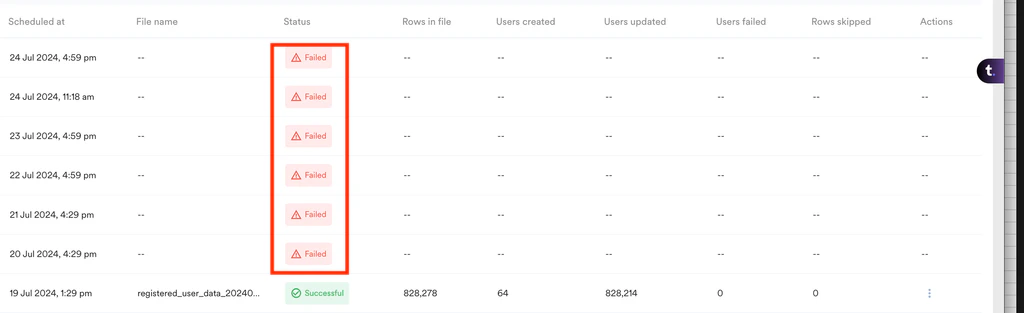
1. **Check for common issues:** If imports fail, check the status details. Hovering over the status may show a "file not found" error.
2. **File size:** Ensure that each file is not larger than 200 MB.
3. **Handling 504 errors:**
* 504 errors often occur due to large numbers of files in a single S3 bucket. If there are over 1000 files in one folder, it can cause timeouts.
* To resolve this, split the folder into multiple folders with fewer files (\<=100 for each folder). The backend S3 import fetch file API currently has a timeout of 5 minutes.
## Instructions
Perform the following steps:
1. **Check for common issues:** If imports fail, check the status details. Hovering over the status may show a "file not found" error.
2. **File size:** Ensure that each file is not larger than 200 MB.
3. **Handling 504 errors:**
* 504 errors often occur due to large numbers of files in a single S3 bucket. If there are over 1000 files in one folder, it can cause timeouts.
* To resolve this, split the folder into multiple folders with fewer files (\<=100 for each folder). The backend S3 import fetch file API currently has a timeout of 5 minutes.