> ## Documentation Index
> Fetch the complete documentation index at: https://moengage.com/docs/llms.txt
> Use this file to discover all available pages before exploring further.
# Computed Traits - Overview
> Computed traits are dynamic user attributes auto-calculated from event data. Build richer profiles for segmentation without any coding work.
This is an Early Access feature. To enable it for your account, please contact your MoEngage Customer Success Manager (CSM) or the Support team.
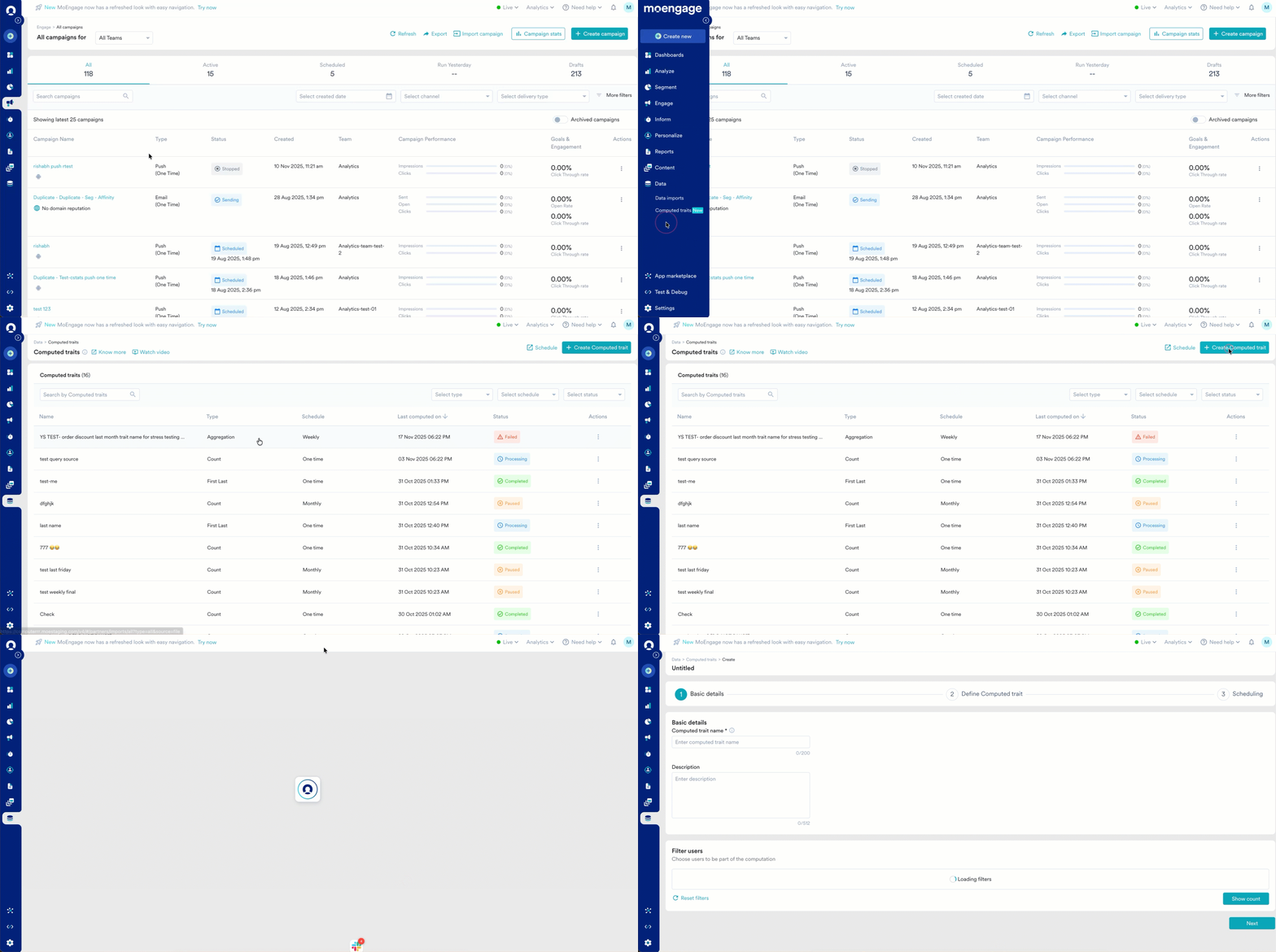
Computed traits are dynamic user attributes that you can create by applying calculations and transformations to the existing event data you collect in MoEngage. Think of them as smart, custom-built user properties that get automatically updated based on user behavior.
Instead of relying on developers to track a specific attribute like *Lifetime Value* (LTV) or manually uploading CSV files, you can create a computed trait that automatically calculates this attribute based on user behavior. This allows you to build richer, more accurate user profiles and unlock deeper segmentation and personalization opportunities.
 # Use Cases
Computed traits help you move beyond static user data and engage users based on their real-time activities and preferences. Here are some use cases:
* **Hyper-personalization:** Tailor campaigns with dynamic values like a user's total savings or loyalty points to create highly relevant messages that boost engagement and drive conversions.
* **Advanced segmentation:** Create highly specific segments, such as "power users" or "at-risk customers," to run targeted campaigns that improve user retention and increase LTV.
* **Automate data enrichment:** Automatically calculate and store key metrics like a user's favorite product category, eliminating manual work and ensuring your campaigns are always based on the latest user data, which improves campaign efficiency and relevance.
## Use Cases by Industry
For ready-to-build traits tailored to your industry, explore these references. Each lists the computation method, data source, and business use case for every trait:
* [Banking, Financial Services, and Insurance](/docs/use-cases/computed-traits/computed-traits-for-bfsi)
* [E-commerce](/docs/use-cases/computed-traits/computed-traits-for-e-commerce)
* [Telecom](/docs/use-cases/computed-traits/computed-traits-for-telecom)
* [Media and Entertainment](/docs/use-cases/computed-traits/computed-traits-for-media-and-entertainment)
* [Retail](/docs/use-cases/computed-traits/computed-traits-for-retail)
* [Content Streaming](/docs/use-cases/computed-traits/computed-traits-for-content-streaming)
# Methods of Computations
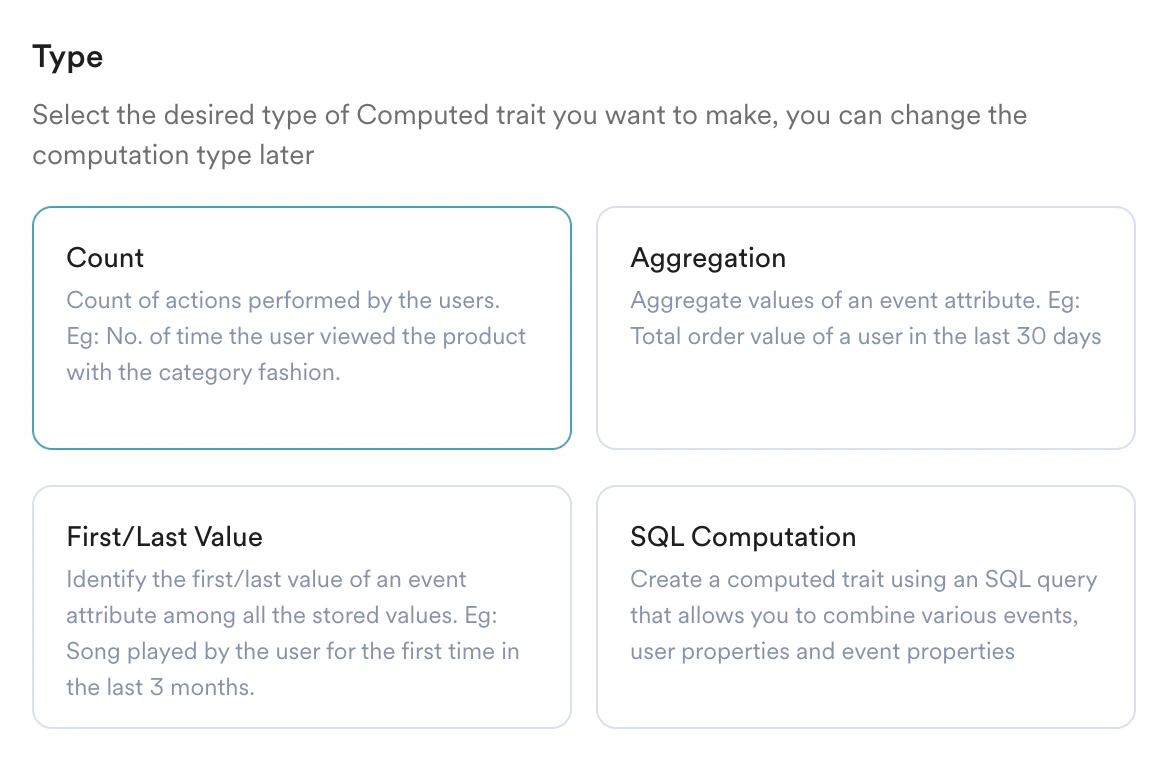
You can create computed traits using several methods:
# Use Cases
Computed traits help you move beyond static user data and engage users based on their real-time activities and preferences. Here are some use cases:
* **Hyper-personalization:** Tailor campaigns with dynamic values like a user's total savings or loyalty points to create highly relevant messages that boost engagement and drive conversions.
* **Advanced segmentation:** Create highly specific segments, such as "power users" or "at-risk customers," to run targeted campaigns that improve user retention and increase LTV.
* **Automate data enrichment:** Automatically calculate and store key metrics like a user's favorite product category, eliminating manual work and ensuring your campaigns are always based on the latest user data, which improves campaign efficiency and relevance.
## Use Cases by Industry
For ready-to-build traits tailored to your industry, explore these references. Each lists the computation method, data source, and business use case for every trait:
* [Banking, Financial Services, and Insurance](/docs/use-cases/computed-traits/computed-traits-for-bfsi)
* [E-commerce](/docs/use-cases/computed-traits/computed-traits-for-e-commerce)
* [Telecom](/docs/use-cases/computed-traits/computed-traits-for-telecom)
* [Media and Entertainment](/docs/use-cases/computed-traits/computed-traits-for-media-and-entertainment)
* [Retail](/docs/use-cases/computed-traits/computed-traits-for-retail)
* [Content Streaming](/docs/use-cases/computed-traits/computed-traits-for-content-streaming)
# Methods of Computations
You can create computed traits using several methods:
 ## Count, Aggregation, and First/Last Value
These methods allow you to create a computed trait by performing calculations on event data over a specific time period.
* **Count:** Counts the number of times a user has performed an event.
* **Aggregation:** Calculates the sum, average, minimum, or maximum value of an event attribute.
* **First/Last value:** Identifies the first or last recorded value of an event attribute for a user.
## Use Cases
* **Count:** Create a *Total Orders in Last 90 Days* trait by using **Count** on your *Order Placed* event. Use this to identify and reward frequent shoppers.
* **Aggregation (Sum):** Calculate a *Total Amount Invested* trait by using **Sum** on the "amount" attribute of your *Investment Successful* event. This helps you segment users into different investment tiers.
* **Aggregation (Count Distinct):** Create a *Distinct Genres Watched* trait by using **Count Distinct** on the *genre* attribute of your *Video Played* event. This helps you understand a user's content preferences for better recommendations.
* **First/Last Value:** Identify a user's *First Played Song Genre* with the **First Value** computation on the *genre* attribute of the *Song Played* event to understand their initial interests.
## SQL Compute
For more complex calculations, you can use **SQL** (Structured Query Language) to define your computed trait. This gives you the flexibility to combine multiple events and user attributes, create conditional logic, and define sophisticated metrics.
## Use Cases
* Create a *Lead Score* trait. Write a SQL query to count user engagement events, like Page View. Based on the count, use conditional logic to set a user attribute to "Strong" (for example, if page view count > 20) or "Weak" (for example, if page view count > 10), helping sales teams prioritize leads.
* Create a *High-Value Churn Risk* trait. Write a SQL query to find users who have spent over \$500 in their lifetime but haven't made a purchase in the last 60 days.
* Define a *Loan Pre-Qualified* trait. Use SQL to check if a user has completed key application events (for example, *Viewed Loan Offer*, *Submitted Documents*) and meets certain user attribute criteria (for example, *Credit Score 700*).
* Identify *Artist Super Fans* with a SQL query that counts the number of times a user has played songs from a specific artist and also registered for that artist's virtual concert event.
* Create a *Binge Watcher* trait by writing a SQL query to identify users who have watched three or more episodes of the same series within a 24-hour window.
# Next Steps
* [Create a Computed Trait](/docs/user-guide/data/computed-traits/create-a-computed-trait)
## Count, Aggregation, and First/Last Value
These methods allow you to create a computed trait by performing calculations on event data over a specific time period.
* **Count:** Counts the number of times a user has performed an event.
* **Aggregation:** Calculates the sum, average, minimum, or maximum value of an event attribute.
* **First/Last value:** Identifies the first or last recorded value of an event attribute for a user.
## Use Cases
* **Count:** Create a *Total Orders in Last 90 Days* trait by using **Count** on your *Order Placed* event. Use this to identify and reward frequent shoppers.
* **Aggregation (Sum):** Calculate a *Total Amount Invested* trait by using **Sum** on the "amount" attribute of your *Investment Successful* event. This helps you segment users into different investment tiers.
* **Aggregation (Count Distinct):** Create a *Distinct Genres Watched* trait by using **Count Distinct** on the *genre* attribute of your *Video Played* event. This helps you understand a user's content preferences for better recommendations.
* **First/Last Value:** Identify a user's *First Played Song Genre* with the **First Value** computation on the *genre* attribute of the *Song Played* event to understand their initial interests.
## SQL Compute
For more complex calculations, you can use **SQL** (Structured Query Language) to define your computed trait. This gives you the flexibility to combine multiple events and user attributes, create conditional logic, and define sophisticated metrics.
## Use Cases
* Create a *Lead Score* trait. Write a SQL query to count user engagement events, like Page View. Based on the count, use conditional logic to set a user attribute to "Strong" (for example, if page view count > 20) or "Weak" (for example, if page view count > 10), helping sales teams prioritize leads.
* Create a *High-Value Churn Risk* trait. Write a SQL query to find users who have spent over \$500 in their lifetime but haven't made a purchase in the last 60 days.
* Define a *Loan Pre-Qualified* trait. Use SQL to check if a user has completed key application events (for example, *Viewed Loan Offer*, *Submitted Documents*) and meets certain user attribute criteria (for example, *Credit Score 700*).
* Identify *Artist Super Fans* with a SQL query that counts the number of times a user has played songs from a specific artist and also registered for that artist's virtual concert event.
* Create a *Binge Watcher* trait by writing a SQL query to identify users who have watched three or more episodes of the same series within a 24-hour window.
# Next Steps
* [Create a Computed Trait](/docs/user-guide/data/computed-traits/create-a-computed-trait)