> ## Documentation Index
> Fetch the complete documentation index at: https://moengage.com/docs/llms.txt
> Use this file to discover all available pages before exploring further.
# Gmail Annotations
> Annotate your MoEngage emails with Gmail deal badges and product carousels. Help users engage with promotions directly from their Gmail inbox.
# Overview
Gmail annotations help customers conveniently view and engage with your promotions from their inboxes. Annotating emails enhances the content of your emails within the Promotions folder by incorporating elements like images, deals, and expiration dates from which customers can directly access the information without opening the emails. You can annotate emails to display the following features in the *Promotions* tab of Gmail:
* [Deal Annotations](/docs/user-guide/campaigns-and-channels/email/create/gmail-annotations#create-a-deal-annotation)
* [Product Carousel](/docs/user-guide/campaigns-and-channels/email/create/gmail-annotations#create-a-product-carousel)
- This feature applies to recipients who use Gmail as their mailbox provider.
- This feature applies only to emails in the *Promotions* tab of Gmail.
- This feature works only for personal email IDS and not Google Workspace accounts.
- Deal Annotations are rendered for all users on mobile and desktop devices.
- The Product Carousel is rendered only on the mobile app, and its rendering depends on various factors determined by Google. For more information, refer to the [Prerequisite](/docs/user-guide/campaigns-and-channels/email/create/gmail-annotations#prerequisite) section.
- Due to limitations around personalization, the click tracking of promo URLs is not supported.
- Product Carousel are currently not visible for users who are located in the European Union. This restriction does not apply to the United Kingdom (UK). Conversely, the Deal Annotation feature remains fully functional and is visible within the European Union without requiring any special allowlisting.
# Advantages of Email Annotations
Annotating emails in email campaigns can offer several advantages:
* **Enhanced visual appeal**: Annotations allow the incorporation of elements like images, making the emails more visually engaging and captivating for recipients.
* **Better interaction**: Annotations enable your customers to interact with promotions directly from their inbox, promoting higher engagement and action, such as clicking the annotated text or image.
* **Improved accessibility**: Annotations allow your customers to access more promotional information without opening the entire email, saving time and effort. This can increase the likelihood of customers exploring and engaging with the promoted content.
* **Enhanced promotional value**: Annotations provide a platform to highlight key aspects of the promotions, such as deals and expiration dates. This makes it easier for your customers to get essential details, increasing their interest in the offer.
* **Convenient mobile experience**: Annotations target recipients who use Gmail on their mobile devices. They enhance the mobile experience, taking advantage of the increasing smartphone dependence on email browsing.
# Prerequisite
* SPF, DKIM, and DMARC authentications must be configured for the sending domain as follows:
* If you use MoEngage as your email sender, the SPF, DKIM, and DMARC authentication configurations are completed as part of onboarding.
* If you use your own email service provider, check if the SPF, DKIM, and DMARC authentication configuration is set up correctly.
* The sender domain (not email ID) must be allowed to be listed with Google. For this, an email must be sent to [p-gmail-outreach@google.com](mailto:p-gmail-outreach@google.com).
* The Product Carousel is subject to a Density Cap limitation, which requires it to be deployed to a bulk audience for proper rendering. While there is no explicit definition of *bulk*, an audience size exceeding 100 individuals is considered a fair estimation.
* It should be noted that sending a marked-up email to oneself for testing purposes won’t result in annotations appearing in the inbox. However, marketers can preview the annotations in the MoEngage dashboard. Google also offers a [tool](https://developers.google.com/gmail/promotab/preview) for this purpose.
* The algorithm is believed to render annotations where the content
* abides by the [ad policies of Google](https://support.google.com/adspolicy/answer/6008942?hl=en)
* uses high-quality imagery with correct aspect ratios
* not personalized
* comes from brands with a history of engagement.
* High-quality images with specified aspect ratios must be used while creating Deal Annotations and Product Carousel. The aspect ratios are mentioned [here](https://developers.google.com/gmail/promotab/best-practices).
# Configure Gmail Annotations in MoEngage
Perform the following steps to configure Gmail annotations while [creating an email campaign](/docs/user-guide/campaigns-and-channels/email/create/create-an-email-campaign):
1. Navigate to **Step 2: Create Content** in email campaigns.
2. Select the templates from any of the following options:
* **Drag and drop editor**
* **Custom HTML editor**
* **My saved templates**
3. After selecting the template, navigate to the **Email details** section.
4. In the **Gmail annotation** tab, click **Add Gmail annotation**.
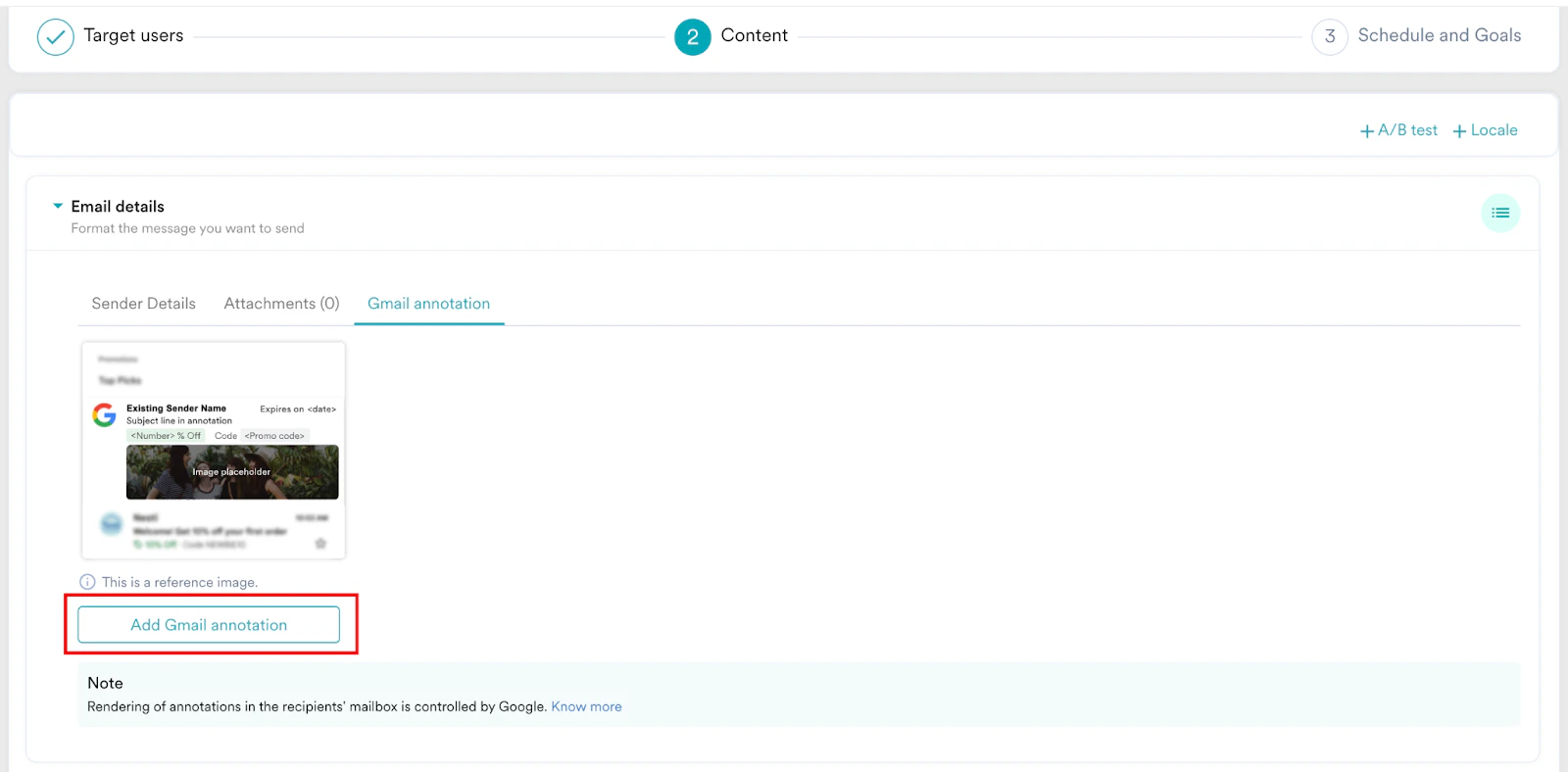 5. In the expanded view of the page, to add the **Sender logo**, click one of the following options:
* **Image URL**: Add the image URL in PNG or JPEG format. For example, [*https://www.example.com/image.png*](https://www.example.com/image.png). For best practices regarding logo URL, refer [here](https://developers.google.com/gmail/promotab/best-practices#logo_url).\
To personalize the sender logo, refer to [Personalize Email Content](/docs/user-guide/campaigns-and-channels/email/create/personalize-email-content).
* **Upload image**: Upload the image using the drag-and-drop option or upload it from the computer. For best practices regarding images, refer [here.](https://developers.google.com/gmail/promotab/best-practices#images)
5. In the expanded view of the page, to add the **Sender logo**, click one of the following options:
* **Image URL**: Add the image URL in PNG or JPEG format. For example, [*https://www.example.com/image.png*](https://www.example.com/image.png). For best practices regarding logo URL, refer [here](https://developers.google.com/gmail/promotab/best-practices#logo_url).\
To personalize the sender logo, refer to [Personalize Email Content](/docs/user-guide/campaigns-and-channels/email/create/personalize-email-content).
* **Upload image**: Upload the image using the drag-and-drop option or upload it from the computer. For best practices regarding images, refer [here.](https://developers.google.com/gmail/promotab/best-practices#images)
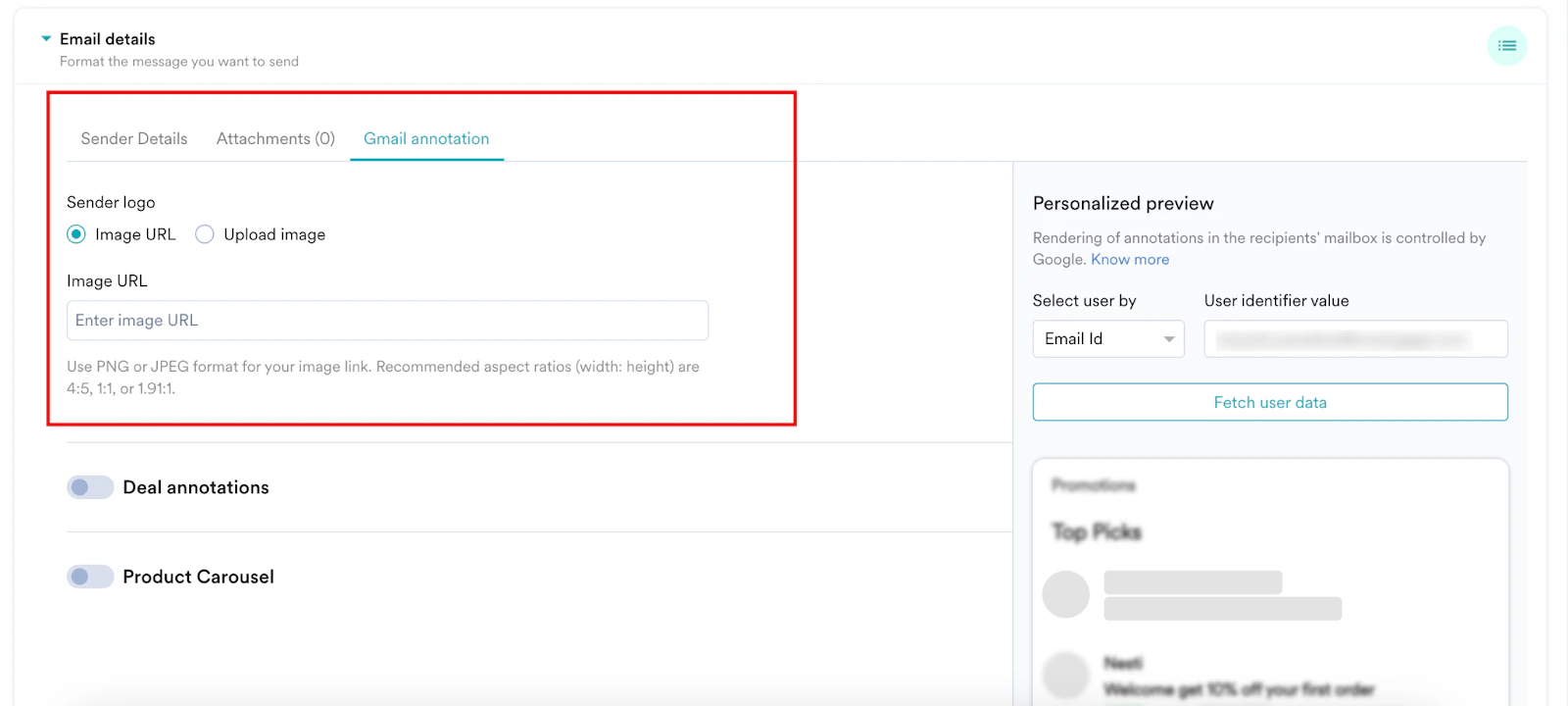 You can annotate your promotional emails using a combination of [Deal Annotations](/docs/user-guide/campaigns-and-channels/email/create/gmail-annotations#create-a-deal-annotation) and [Product Carousel](/docs/user-guide/campaigns-and-channels/email/create/gmail-annotations#create-a-product-carousel) or any of them. Use the toggles to enable or disable the features as required. The sender logo applies to both Deal annotations and Product carousels.
The following sections explain how to create each type of email annotation.
# Create a Deal Annotation
A deal annotation displays text-based details about a promotion, such as a promotion code or expiration date. Perform the following steps to create a deal card:
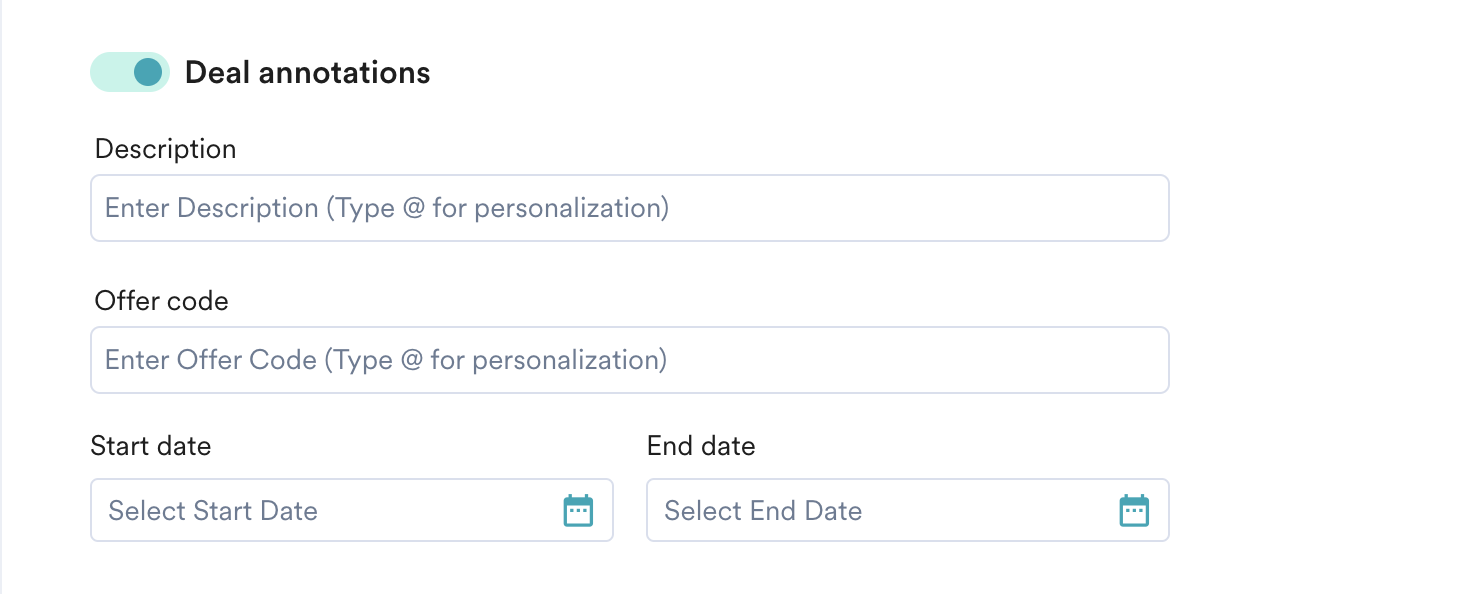
1. After adding the sender logo, turn the **Deal annotations** toggle on and enter the following details:
| Field | Description |
| ------------------------------------------------------------------------------------------------------------------------------------------------------------------------------------------------------------------------- | ---------------------------------------------------------------------------------------------------------------------------------------------------------------------------------------------------------------------------------------------------------------------------------------------------------------------------------------------------------------------------------- |
| **Description** | Type a description for the deal card. This text is displayed as a deal badge. Make sure that you do not use more than four words or full sentence in this box, this may truncates the added description. For example, *40% off* or *Sale is here*. For best practices regarding deal badge, refer [here](https://developers.google.com/gmail/promotab/best-practices#deal_badge). |
| **Offer code** | Type the discount or promotion code for the offer. Make sure that you the limit the characters added for optimal rendering. For example, *DEAL60*. For best practices regarding discount code, refer [here](https://developers.google.com/gmail/promotab/best-practices#discount_code). |
| **Start date** | Select your offer's start date and time. |
| **End date** | Select your offer's end date and time. Ensure that your offer's end date is aligned with the campaign start date. If this condition is not satisfied, the Google annotation may not be displayed in the recipient inbox. |
|  | |
2. You can preview the contents of your deal annotation under the **Personalized Preview** section. Note that you can personalize all the above boxes of Deal annotation. To know more about personalization, refer to [Personalize Email Content](/docs/user-guide/campaigns-and-channels/email/create/personalize-email-content).
You can annotate your promotional emails using a combination of [Deal Annotations](/docs/user-guide/campaigns-and-channels/email/create/gmail-annotations#create-a-deal-annotation) and [Product Carousel](/docs/user-guide/campaigns-and-channels/email/create/gmail-annotations#create-a-product-carousel) or any of them. Use the toggles to enable or disable the features as required. The sender logo applies to both Deal annotations and Product carousels.
The following sections explain how to create each type of email annotation.
# Create a Deal Annotation
A deal annotation displays text-based details about a promotion, such as a promotion code or expiration date. Perform the following steps to create a deal card:
1. After adding the sender logo, turn the **Deal annotations** toggle on and enter the following details:
| Field | Description |
| ------------------------------------------------------------------------------------------------------------------------------------------------------------------------------------------------------------------------- | ---------------------------------------------------------------------------------------------------------------------------------------------------------------------------------------------------------------------------------------------------------------------------------------------------------------------------------------------------------------------------------- |
| **Description** | Type a description for the deal card. This text is displayed as a deal badge. Make sure that you do not use more than four words or full sentence in this box, this may truncates the added description. For example, *40% off* or *Sale is here*. For best practices regarding deal badge, refer [here](https://developers.google.com/gmail/promotab/best-practices#deal_badge). |
| **Offer code** | Type the discount or promotion code for the offer. Make sure that you the limit the characters added for optimal rendering. For example, *DEAL60*. For best practices regarding discount code, refer [here](https://developers.google.com/gmail/promotab/best-practices#discount_code). |
| **Start date** | Select your offer's start date and time. |
| **End date** | Select your offer's end date and time. Ensure that your offer's end date is aligned with the campaign start date. If this condition is not satisfied, the Google annotation may not be displayed in the recipient inbox. |
|  | |
2. You can preview the contents of your deal annotation under the **Personalized Preview** section. Note that you can personalize all the above boxes of Deal annotation. To know more about personalization, refer to [Personalize Email Content](/docs/user-guide/campaigns-and-channels/email/create/personalize-email-content).
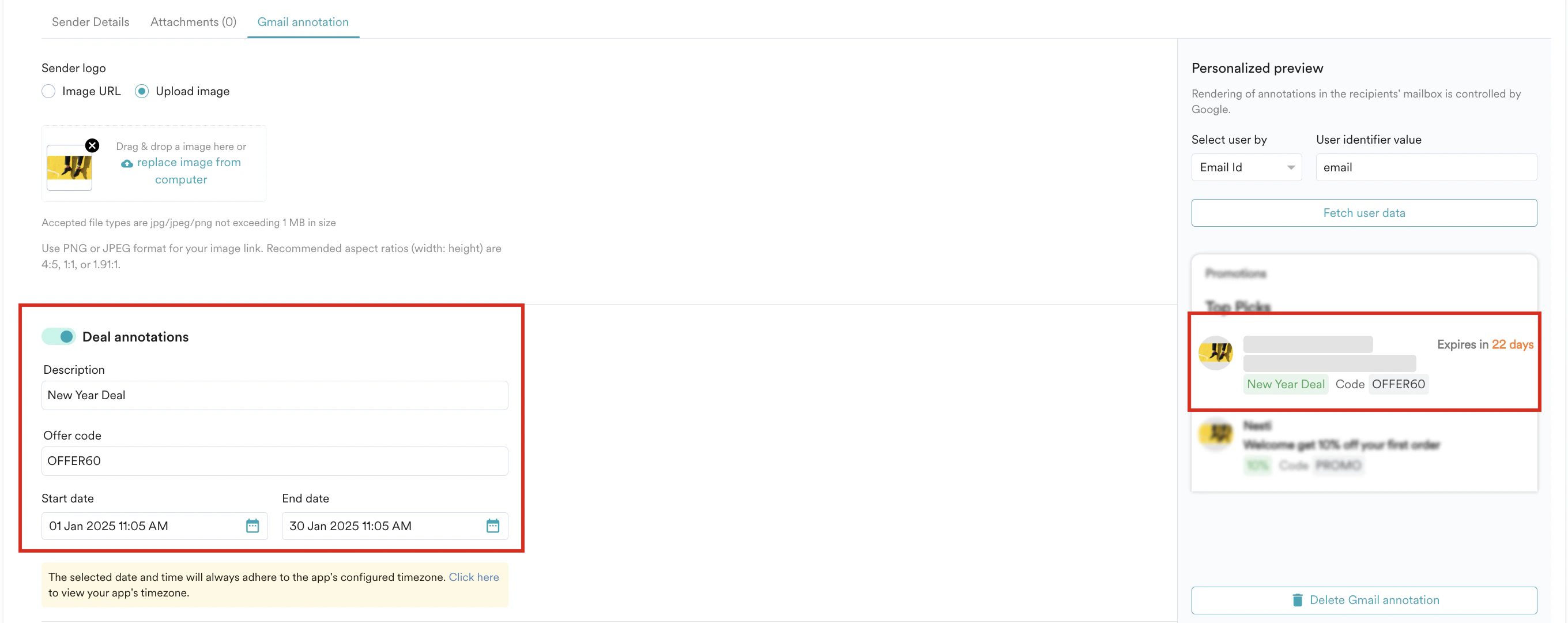 3. After personalizing, click **Fetch user data** in the **Personalised Preview** section to view the personalized data in the preview.
4. Click **Delete Gmail annotation** to delete the created deal annotation.
# Create a Product Carousel
A product carousel displays multiple image previews for a promotion. You can add a maximum of 10 unique image previews in a carousel. MoEngage provides the following options for adding a product carousel:
* [Manual](/docs/user-guide/campaigns-and-channels/email/create/gmail-annotations#using-manual-option)
* [Product Set](/docs/user-guide/campaigns-and-channels/email/create/gmail-annotations#using-product-set-option)
## Using Manual Option
This option allows you to keep the list of products added to the carousel the same for all your targeted customers. This option is selected by default, and you must add at least two products to the carousel.\
Perform the following steps to create a product carousel using the manual option. You must provide the following details for each product you want to add to the carousel:
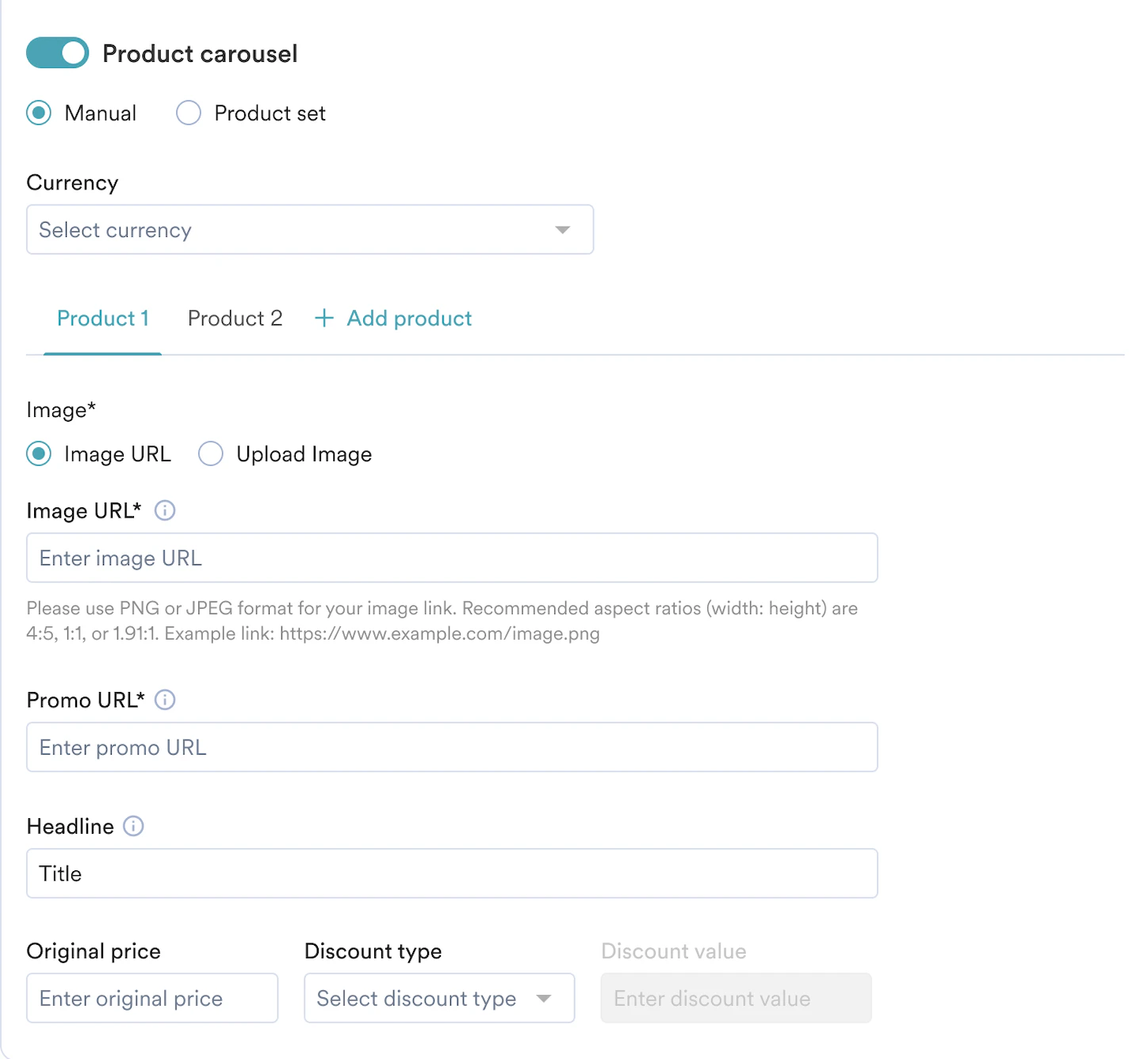
Under the **Product 1** tab, add the following details for **Product 1**; similarly, under the **Product 2** tab, add the following details for **Product 2**. You can add a maximum of 10 products to the carousel by clicking **+ Add product**.
1. After adding the sender logo, turn the **Product carousel** toggle on
2. Select the **Manual** option and enter the following details:
| Field | Description |
| ------------------ | ----------------------------------------------------------------------------------------------------------------------------------------------------------------------------------------------------------------------------------------------------------------------------------------------------------------------------------------------------------------------------------------------------------------------------------------------------------------------------------------------------------------------------------------------------------------------------------------------------------------------------------------------------------------------------------------------------------------------------------------------------------------------------------------------------------------------------------------------------------------------------------------------------------------------------------------------------------------------------------------------------------------------------------------------------------------------------------------------------------------------------------------------------------------------------------------------------------------------------------------------------------------------------------------------------------------------------------------------------------------------------------------------------------------------------------------------------------------------------------------------------------------------------------------------------------------------------------------------------------------------------------------------------------------------------------------------------------------------------------------------------------------------------------------------------------------------------------------------------------------------------------------------------------------------------------------------------------------------------------------------------------------------------------------------------------------------------------------------------------------------------------------------------------------------------------------------------------------------------------------------------------------------------------------------------------------------------------------------------- |
| **Currency** | Select the currency of the price. |
| **Image** | Add images to the carousel using one of the following options:
3. After personalizing, click **Fetch user data** in the **Personalised Preview** section to view the personalized data in the preview.
4. Click **Delete Gmail annotation** to delete the created deal annotation.
# Create a Product Carousel
A product carousel displays multiple image previews for a promotion. You can add a maximum of 10 unique image previews in a carousel. MoEngage provides the following options for adding a product carousel:
* [Manual](/docs/user-guide/campaigns-and-channels/email/create/gmail-annotations#using-manual-option)
* [Product Set](/docs/user-guide/campaigns-and-channels/email/create/gmail-annotations#using-product-set-option)
## Using Manual Option
This option allows you to keep the list of products added to the carousel the same for all your targeted customers. This option is selected by default, and you must add at least two products to the carousel.\
Perform the following steps to create a product carousel using the manual option. You must provide the following details for each product you want to add to the carousel:
Under the **Product 1** tab, add the following details for **Product 1**; similarly, under the **Product 2** tab, add the following details for **Product 2**. You can add a maximum of 10 products to the carousel by clicking **+ Add product**.
1. After adding the sender logo, turn the **Product carousel** toggle on
2. Select the **Manual** option and enter the following details:
| Field | Description |
| ------------------ | ----------------------------------------------------------------------------------------------------------------------------------------------------------------------------------------------------------------------------------------------------------------------------------------------------------------------------------------------------------------------------------------------------------------------------------------------------------------------------------------------------------------------------------------------------------------------------------------------------------------------------------------------------------------------------------------------------------------------------------------------------------------------------------------------------------------------------------------------------------------------------------------------------------------------------------------------------------------------------------------------------------------------------------------------------------------------------------------------------------------------------------------------------------------------------------------------------------------------------------------------------------------------------------------------------------------------------------------------------------------------------------------------------------------------------------------------------------------------------------------------------------------------------------------------------------------------------------------------------------------------------------------------------------------------------------------------------------------------------------------------------------------------------------------------------------------------------------------------------------------------------------------------------------------------------------------------------------------------------------------------------------------------------------------------------------------------------------------------------------------------------------------------------------------------------------------------------------------------------------------------------------------------------------------------------------------------------------------------------- |
| **Currency** | Select the currency of the price. |
| **Image** | Add images to the carousel using one of the following options: - **Image URL**: The URL to your image in PNG or JPEG format. For example, [https://www.example.com/image.png](https://www.example.com/image.png). You can personalize each image in the product carousel. For more information, refer to [Personalize Email Content](/docs/user-guide/campaigns-and-channels/email/create/personalize-email-content).
- **Upload Image**: Upload the image using the drag-and-drop option or upload it from the computer. For best practices regarding images, refer [here.](https://developers.google.com/gmail/promotab/best-practices#images)
|
| **Promo URL** | Type the promotion URL. Your customers visit this URL when clicking the image in the promotions emails. |
| **Headline** | Type a short description of the promotion displayed under the preview image. Note that all the products added must have a headline. If you miss adding a headline for one product, it fails to display headlines for all products. |
| **Original Price** | Type the original price of the products to be displayed on the carousel. Note that all the products added must have an original price. If you miss adding the original price for one product, this fails to display headlines for all products. |
| **Discount type** | Select the type of discount. The following options are available: - **Discounted Price**: This option considers the amount added in the **Discount value** field as the price amount and subtracts this amount from the original price. For example, if the **Original Price** is 700, the **Discount type** is **Discounted Price**, and the **Discount value** is 50, then 50 from the original price will be reduced.
- **Discounted Percentage**: This option considers the amount added in the **Discount value** field in percentage and subtracts this percentage from the original price. For example, if the **Original Price** is 700, the **Discount type** is **Discounted Percentage**, and the **Discount value** is 50, then 50% of the original price will be reduced.
In both cases, the email recipient views the **Original Price** as struck off and the **Discounted Price** emboldened, as shown in the following image: 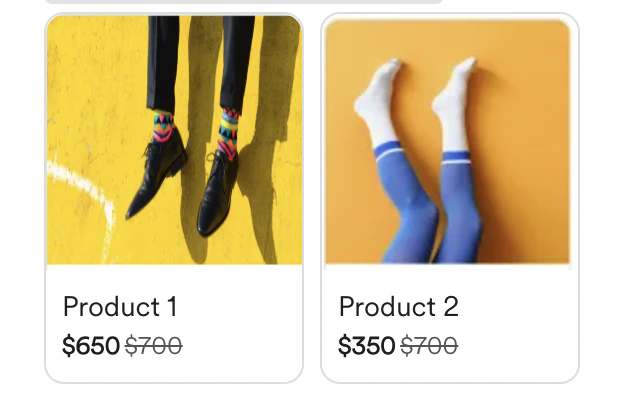 |
| **Discount value** | Type the discount value for your products in the carousel. |
|
| **Discount value** | Type the discount value for your products in the carousel. |
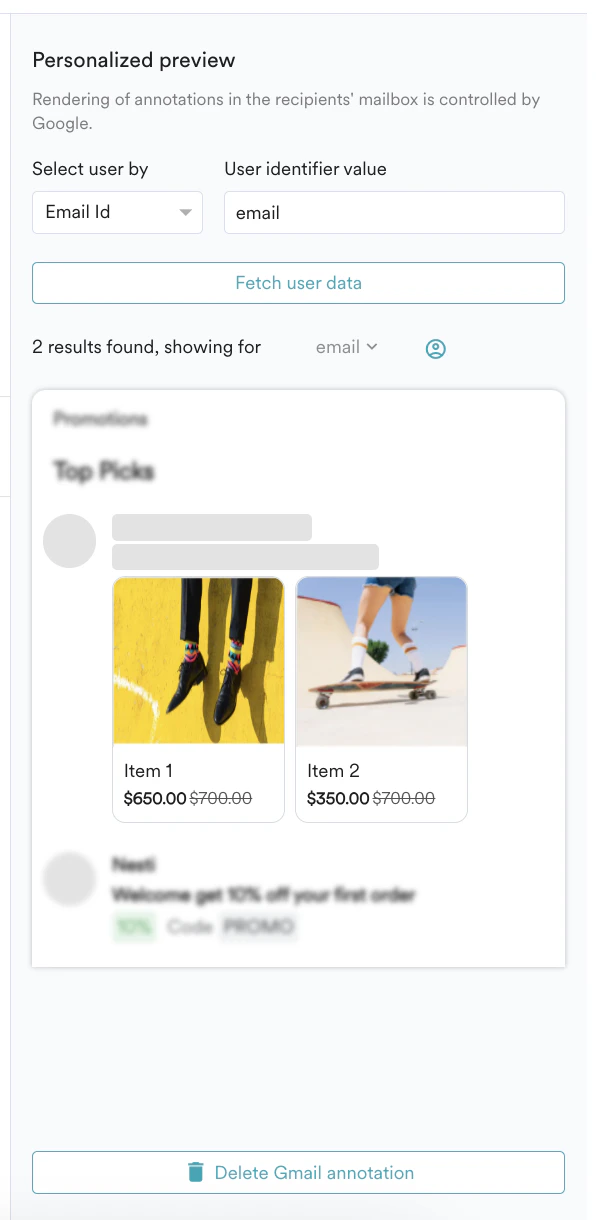
 3. You can preview the contents of your product carousel under the **Preview** section. Note that all the above fields of the Product Carousel can be personalized. To know more about personalization, refer to [Personalize Email Content](/docs/user-guide/campaigns-and-channels/email/create/personalize-email-content).
4. Click **Delete Gmail annotation** to delete the created product carousel.
3. You can preview the contents of your product carousel under the **Preview** section. Note that all the above fields of the Product Carousel can be personalized. To know more about personalization, refer to [Personalize Email Content](/docs/user-guide/campaigns-and-channels/email/create/personalize-email-content).
4. Click **Delete Gmail annotation** to delete the created product carousel.
 ## Using Product Set Option
The product set option lets you fetch a list of products relevant to a particular customer to create a carousel. This option allows you to connect the product catalog to MoEngage and use the product information while creating email annotations. This helps to provide personalized suggestions based on the items in the catalog.\
Note that you must provide the following details for each product to be added to the carousel.
This option is available only for enterprise customers. If you are not able to view this, contact your MoEngage Customer Success Account Manager.
Perform the following steps to create a product carousel using the product set option:
1. After adding the sender logo, turn the **Product carousel** toggle on
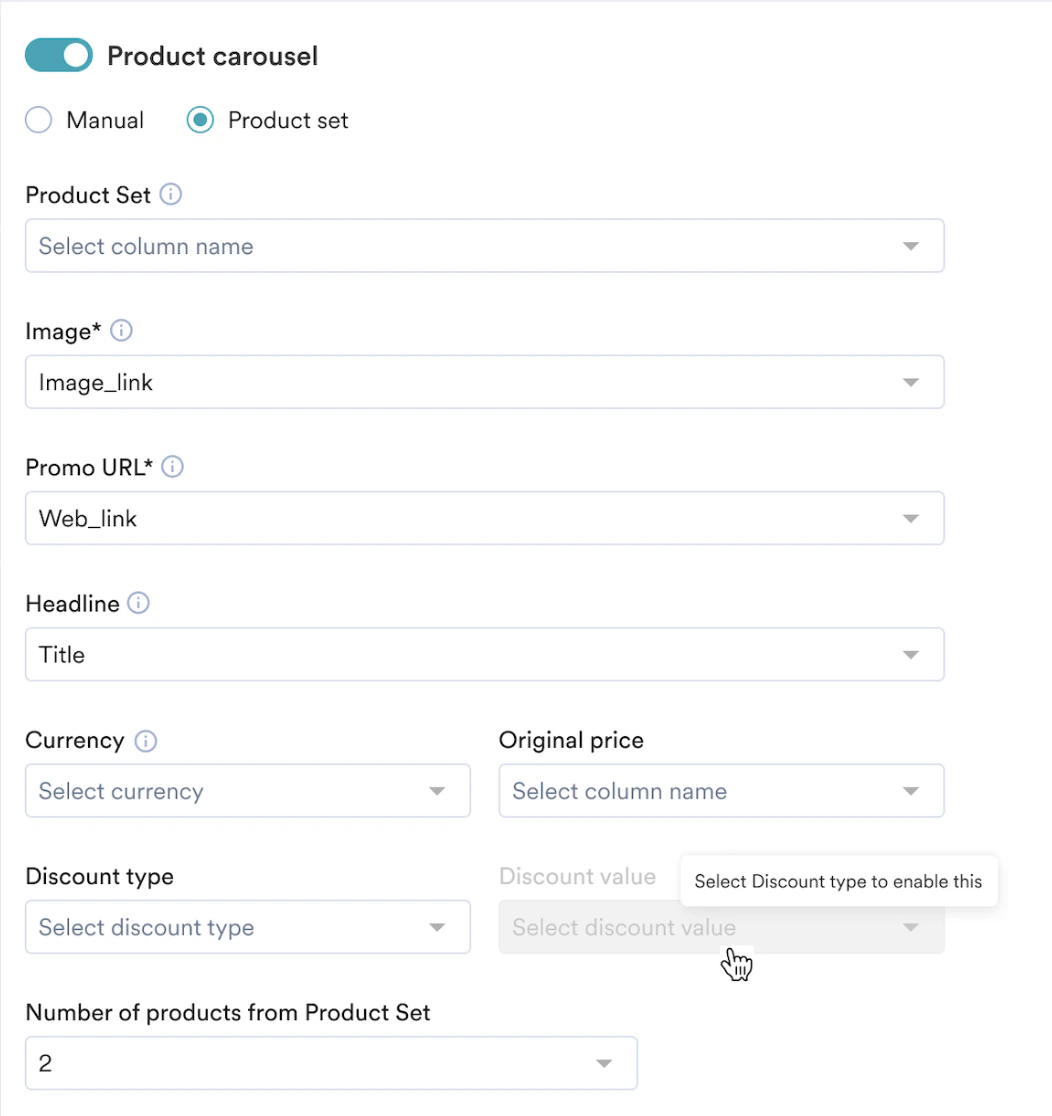
2. Select the **Product set** option and enter the following details:
| Field | Description |
| --------------------------------------- | --------------------------------------------------------------------------------------------------------------------------------------------------------------------------------------------------------------------------------------------------------------------------------------------------------------------------------------------------------------------------------------------------------------------------------------------------------------------------------------------------------------------------------------------------------------------------------------------------------------------------------------------------------------------------------------------------------------------------------------------------------------------------------------------------------------------------------------------------------------------------------------------------------------------------------------------------------------------------------------------------------------------------------------------------------------------------------------------------------------------------------------------------------------------------------------------------------------------------------------------------------------------------------------------------------------------------------------------------------------------------------------------------------------------------------------------------------------------------------------------------------------------------------------------------------------------------------------------------------------------------------------------------------------------------------------------------------------------------------------------------------------------------------------------------------------------------------------------------------------------------------------------------------------------------------------------------------------------------------------------------------------------------------------------------------------------------------------------------------------------------------------------------------------------------------------------------------------------------------------------------------------------------------------------------------------------------------------------------------- |
| **Product set** | Select the product set from which you want to fetch the products. The products from this product set will be displayed in the carousel. By default, the **Image**, **Promo URL**, and **Title** fields are pre-populated with the *image\_link*, *link*, and *title* based on the column name containing this information. |
| **Image** | By default, the **Image** list is pre-populated with the *image\_link*. However, as per your requirement, you can select the column name that contains the information about the image link. |
| **Promo URL** | Your customers are directed to this URL when they click the image in the Promotions emails. By default, the **Promo URL** list is pre-populated with the *link*. However, as per your requirement, you can select the column name that contains the information about the Promo URL. |
| **Headline** | By default, the **Headline** list is pre-populated with the *title*. However, as per your requirement, you can select the column name that contains the information about the title. |
| **Currency** | Select the currency of the price. |
| **Original Price** | Select the column name containing the original price information. |
| **Discount type** | Select the type of discount. The following options are available:
## Using Product Set Option
The product set option lets you fetch a list of products relevant to a particular customer to create a carousel. This option allows you to connect the product catalog to MoEngage and use the product information while creating email annotations. This helps to provide personalized suggestions based on the items in the catalog.\
Note that you must provide the following details for each product to be added to the carousel.
This option is available only for enterprise customers. If you are not able to view this, contact your MoEngage Customer Success Account Manager.
Perform the following steps to create a product carousel using the product set option:
1. After adding the sender logo, turn the **Product carousel** toggle on
2. Select the **Product set** option and enter the following details:
| Field | Description |
| --------------------------------------- | --------------------------------------------------------------------------------------------------------------------------------------------------------------------------------------------------------------------------------------------------------------------------------------------------------------------------------------------------------------------------------------------------------------------------------------------------------------------------------------------------------------------------------------------------------------------------------------------------------------------------------------------------------------------------------------------------------------------------------------------------------------------------------------------------------------------------------------------------------------------------------------------------------------------------------------------------------------------------------------------------------------------------------------------------------------------------------------------------------------------------------------------------------------------------------------------------------------------------------------------------------------------------------------------------------------------------------------------------------------------------------------------------------------------------------------------------------------------------------------------------------------------------------------------------------------------------------------------------------------------------------------------------------------------------------------------------------------------------------------------------------------------------------------------------------------------------------------------------------------------------------------------------------------------------------------------------------------------------------------------------------------------------------------------------------------------------------------------------------------------------------------------------------------------------------------------------------------------------------------------------------------------------------------------------------------------------------------------------------- |
| **Product set** | Select the product set from which you want to fetch the products. The products from this product set will be displayed in the carousel. By default, the **Image**, **Promo URL**, and **Title** fields are pre-populated with the *image\_link*, *link*, and *title* based on the column name containing this information. |
| **Image** | By default, the **Image** list is pre-populated with the *image\_link*. However, as per your requirement, you can select the column name that contains the information about the image link. |
| **Promo URL** | Your customers are directed to this URL when they click the image in the Promotions emails. By default, the **Promo URL** list is pre-populated with the *link*. However, as per your requirement, you can select the column name that contains the information about the Promo URL. |
| **Headline** | By default, the **Headline** list is pre-populated with the *title*. However, as per your requirement, you can select the column name that contains the information about the title. |
| **Currency** | Select the currency of the price. |
| **Original Price** | Select the column name containing the original price information. |
| **Discount type** | Select the type of discount. The following options are available: - **Discounted Price**: This option considers the amount added in the **Discount value** field as the price amount and subtracts this amount from the original price. For example, if the **Original Price** is 700, the **Discount type** is **Discounted Price**, and the **Discount value** is 50, then 50 from the original price will be reduced.
- **Discounted Percentage**: This option considers the amount added in the **Discount value** field in percentage and subtracts this percentage from the original price. For example, if the **Original Price** is 700, the **Discount type** is **Discounted Percentage**, and the **Discount value** is 50, then 50% of the original price will be reduced.
.
In both cases, the email recipient views the **Original Price** as struck off and the **Discounted Price** emboldened, as shown in the following image: |
| **Discount value** | Select the column name containing the discount value information. |
| **Number of products from Product Set** | Select the number of products to be fetched from the product set to be displayed in the carousel. Note that you must select a minimum of 2 products and a maximum of 10 products to be displayed in the carousel. |
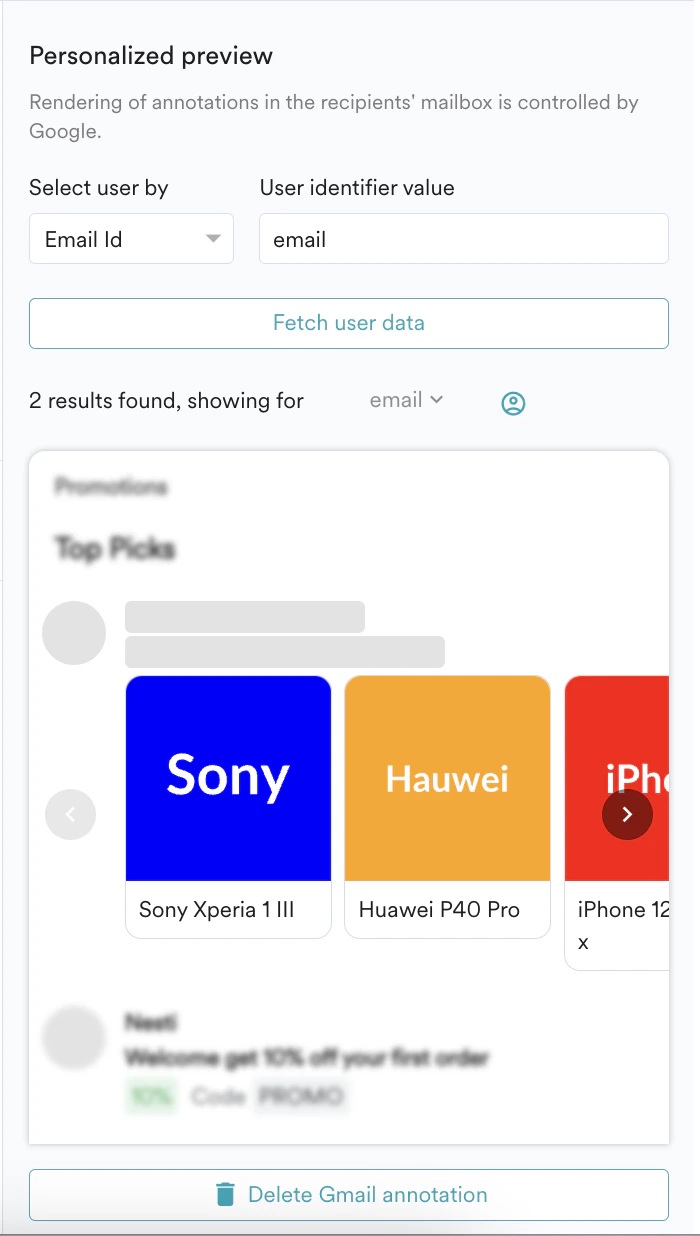
 3. You can preview **Personalized preview** of the product carousel by selecting the user and identifier value.
4. Click **Delete Gmail annotation** to delete the created product carousel.
3. You can preview **Personalized preview** of the product carousel by selecting the user and identifier value.
4. Click **Delete Gmail annotation** to delete the created product carousel.
 # View Created Email Annotations
After creating the email annotations, you can view the created annotations. Perform the following steps to view the created email annotations.
1. Log in to the MoEngage dashboard.
2. On the left navigation menu in the MoEngage dashboard, click **Engage**.
3. In the **All campaigns** page, select the campaign for which you created email annotations.
4. In the **Campaign analytics and info** page, click the **Info** tab and navigate to the **Gmail annotations** section.
# View Created Email Annotations
After creating the email annotations, you can view the created annotations. Perform the following steps to view the created email annotations.
1. Log in to the MoEngage dashboard.
2. On the left navigation menu in the MoEngage dashboard, click **Engage**.
3. In the **All campaigns** page, select the campaign for which you created email annotations.
4. In the **Campaign analytics and info** page, click the **Info** tab and navigate to the **Gmail annotations** section.
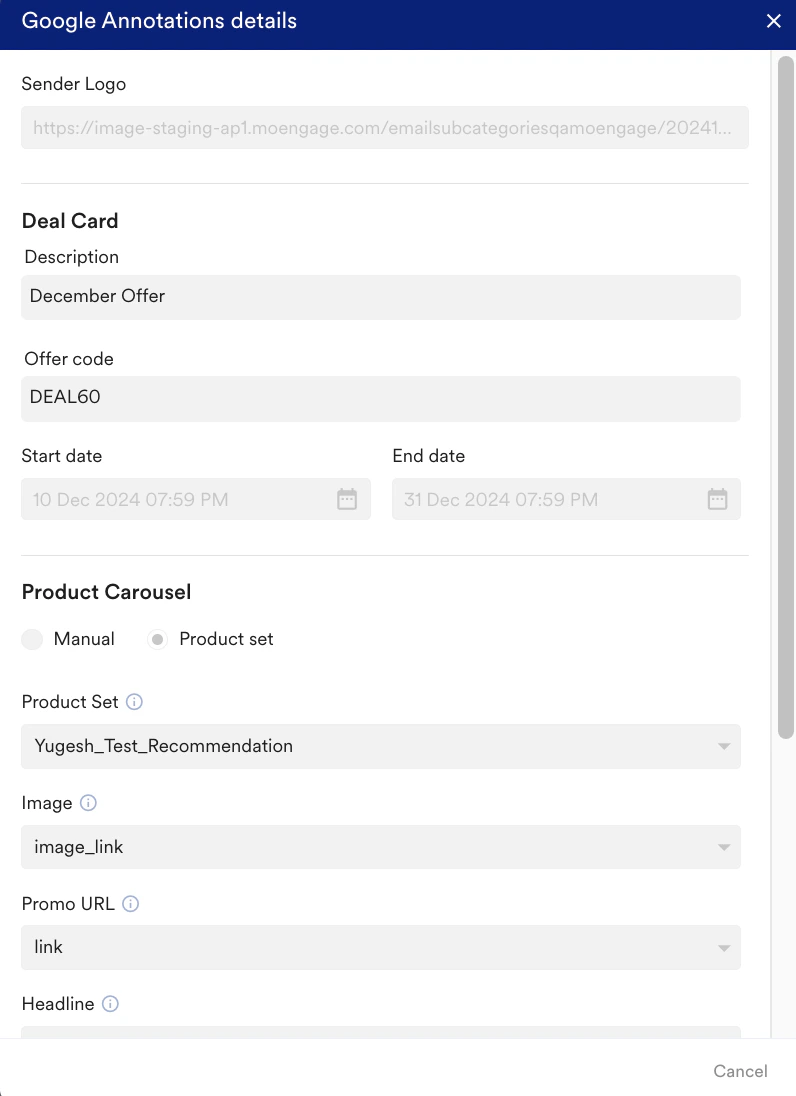
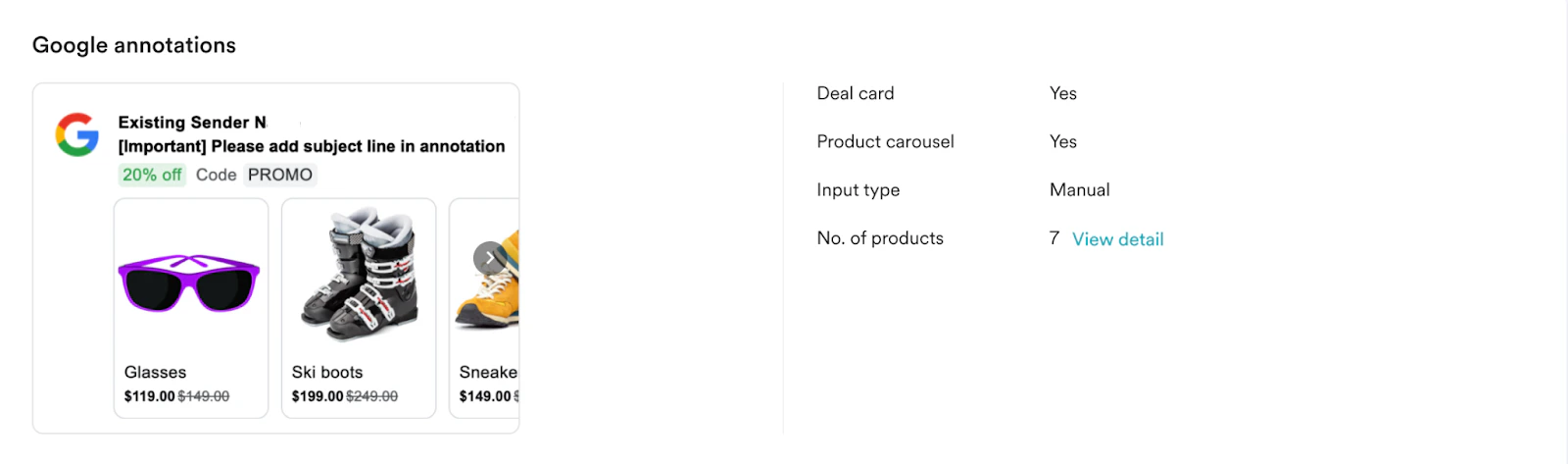 * Click **View details** in the **Gmail Annotations** section to view the annotation details.
* For **Product Carousels**, you can view details of each product under the respective product headlines.
* Click **View details** in the **Gmail Annotations** section to view the annotation details.
* For **Product Carousels**, you can view details of each product under the respective product headlines.
 # Best Practices to Be Followed While Creating Email Annotations
To familiarize yourself with the best practices to be followed while creating email annotations, refer [here](https://developers.google.com/gmail/promotab/best-practices).
# Frequently Asked Questions
To know about the frequently asked questions regarding email annotations, refer [here](https://developers.google.com/gmail/promotab/faq).
# Best Practices to Be Followed While Creating Email Annotations
To familiarize yourself with the best practices to be followed while creating email annotations, refer [here](https://developers.google.com/gmail/promotab/best-practices).
# Frequently Asked Questions
To know about the frequently asked questions regarding email annotations, refer [here](https://developers.google.com/gmail/promotab/faq).