> ## Documentation Index
> Fetch the complete documentation index at: https://moengage.com/docs/llms.txt
> Use this file to discover all available pages before exploring further.
# In-App Nativ
> Display contextual in-app messages to your iOS app users using the MoEngage In-App NATIV SDK.
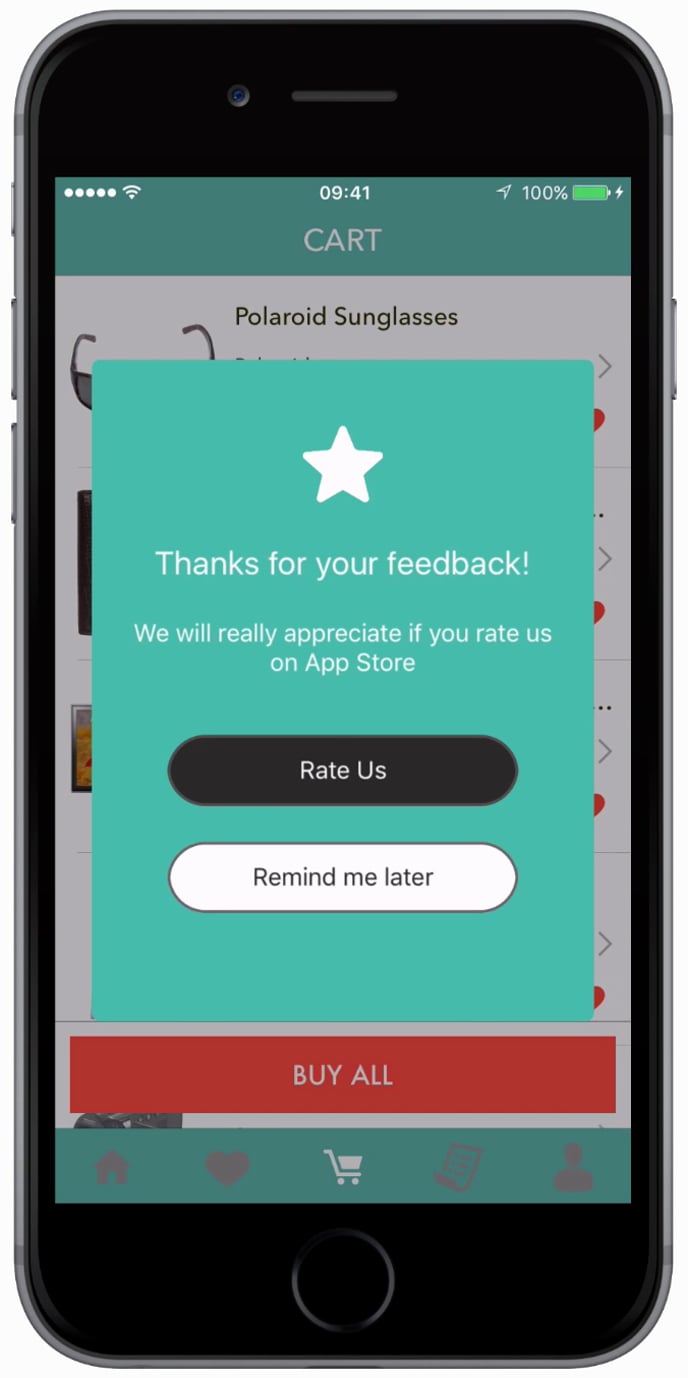
In-App Campaigns are custom views that you can send to a segment of users to show custom messages or give new offers or take to some specific pages. They can be created from your MoEngage account.
**SDK Version**
Follow this doc only if you are using `MoEngage-iOS-SDK` version 8.2.0 and later. If you are using version 5.2.7 or less then follow the doc in this [link](https://developers.moengage.com/hc/en-us/articles/4404155414676).
 # SDK Installation
## Install using Swift Package Manager
MoEngageInApp is supported through SPM from SDK version 3.2.0. To integrate, use the GitHub url [https://github.com/moengage/apple-sdk.git](https://github.com/moengage/apple-sdk.git) for SDK versions equal and above 9.23.0, or [https://github.com/moengage/MoEngage-iOS-SDK.git](https://github.com/moengage/MoEngage-iOS-SDK.git) for other SDK versions link and set the branch as master or the required version.
## Install using CocoaPod
**Information**
CocoaPods is being deprecated. MoEngage recommends using Swift Package Manager for all new integrations. For more info on CocoaPods, refer to [CocoaPods Integration Guide](/developer-guide/ios-sdk/sdk-integration/basic/integration-through-cocoa-pods).
Integrate the MoEngageInApp framework by adding the dependency in the pod file as described.
```ruby Ruby theme={null}
pod 'MoEngage-iOS-SDK/InApps',
```
Now run `pod install` to install the framework.
## Manual Integration
**Manual Integration:**
To integrate the `MoEngageInApp` SDK manually to your project follow this [doc](/developer-guide/ios-sdk/manual-integration/manual-integration).
# How to show In-App Message?
To use In-app Messaging, import `MoEngageInApps` and then add the code below to the view controller(s) in which you want to show the In-app.
```swift Swift wrap theme={null}
import MoEngageInApps
// Add the below line to show inapp
MoEngageSDKInApp.sharedInstance.showInApp()
```
```objective-c Objective-C wrap theme={null}
@import MoEngageInApps;
// Add the below line to show inapp
[[MoEngageSDKInApp sharedInstance] showInApp];
```
# Non Intrusive Nudges
# SDK Installation
## Install using Swift Package Manager
MoEngageInApp is supported through SPM from SDK version 3.2.0. To integrate, use the GitHub url [https://github.com/moengage/apple-sdk.git](https://github.com/moengage/apple-sdk.git) for SDK versions equal and above 9.23.0, or [https://github.com/moengage/MoEngage-iOS-SDK.git](https://github.com/moengage/MoEngage-iOS-SDK.git) for other SDK versions link and set the branch as master or the required version.
## Install using CocoaPod
**Information**
CocoaPods is being deprecated. MoEngage recommends using Swift Package Manager for all new integrations. For more info on CocoaPods, refer to [CocoaPods Integration Guide](/developer-guide/ios-sdk/sdk-integration/basic/integration-through-cocoa-pods).
Integrate the MoEngageInApp framework by adding the dependency in the pod file as described.
```ruby Ruby theme={null}
pod 'MoEngage-iOS-SDK/InApps',
```
Now run `pod install` to install the framework.
## Manual Integration
**Manual Integration:**
To integrate the `MoEngageInApp` SDK manually to your project follow this [doc](/developer-guide/ios-sdk/manual-integration/manual-integration).
# How to show In-App Message?
To use In-app Messaging, import `MoEngageInApps` and then add the code below to the view controller(s) in which you want to show the In-app.
```swift Swift wrap theme={null}
import MoEngageInApps
// Add the below line to show inapp
MoEngageSDKInApp.sharedInstance.showInApp()
```
```objective-c Objective-C wrap theme={null}
@import MoEngageInApps;
// Add the below line to show inapp
[[MoEngageSDKInApp sharedInstance] showInApp];
```
# Non Intrusive Nudges
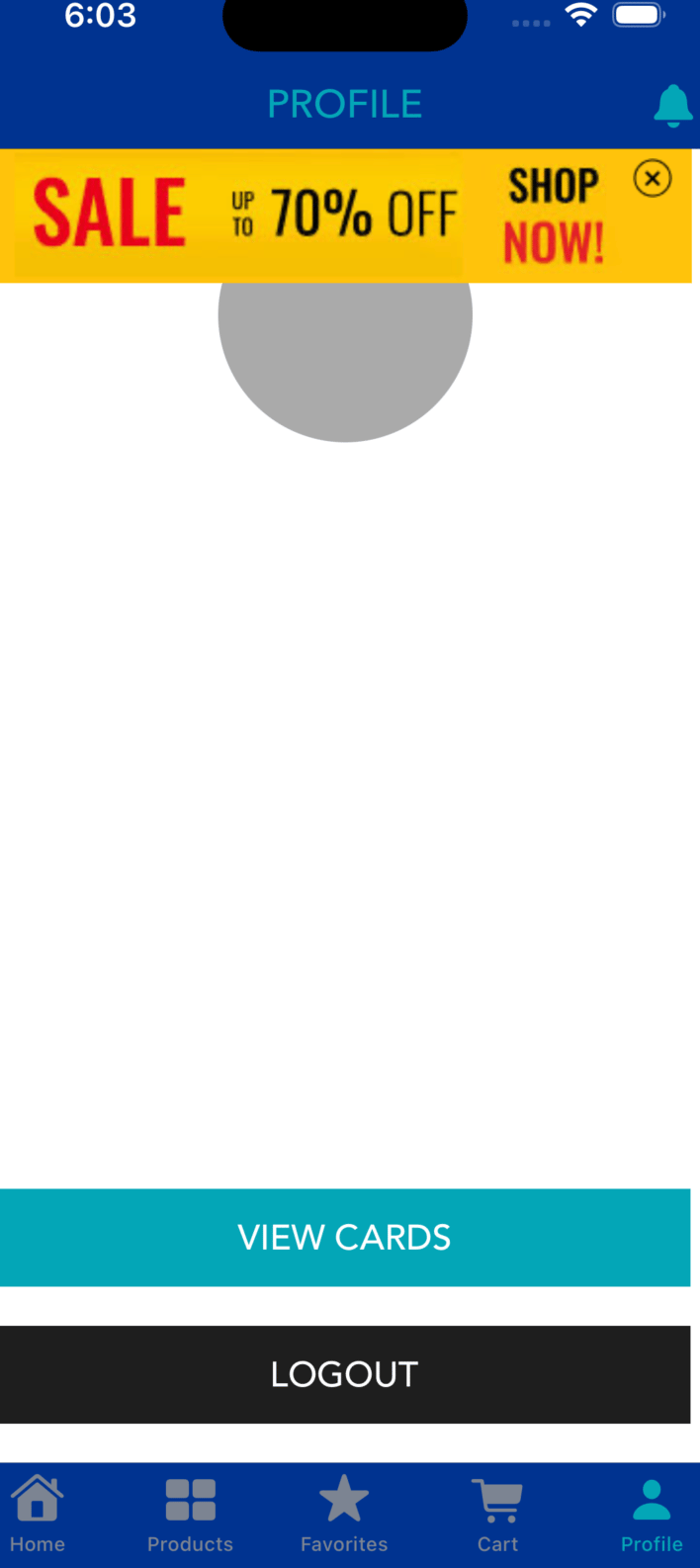 Starting with version ***5.0.0***, MoEngage InApp SDK supports displaying Non-Intrusive nudges.
SDK can show Nudges in four positions (i.e. at the top, bottom, bottom left, and bottom right of the screen). Call the [*showNudge(atPosition:)*](https://moengage.github.io/ios-api-reference/Classes/MoEngageSDKInApp.html#/c:@M@MoEngageInApps@objc\(cs\)MoEngageSDKInApp\(im\)showNudgeAtPosition:) in the view controller(s) where you want SDK to show the nudges :
```swift Swift wrap theme={null}
//For showing nudges at Top of the screen
MoEngageSDKInApp.sharedInstance.showNudge(atPosition: NudgePositionTop)
//For showing nudges at Bottom of the screen
MoEngageSDKInApp.sharedInstance.showNudge(atPosition: NudgePositionBottom)
//For showing nudges at BottomLeft of the screen
MoEngageSDKInApp.sharedInstance.showNudge(atPosition: NudgePositionBottomLeft)
//For showing nudges at BottomRight of the screen
MoEngageSDKInApp.sharedInstance.showNudge(atPosition: NudgePositionBottomRight)
//For showing nudges at any above mentioned position
MoEngageSDKInApp.sharedInstance.showNudge()
```
```objective-c Objective-C wrap theme={null}
//For showing nudges at Top of the screen
[[MoEngageSDKInApp sharedInstance] showNudgeAtPosition:NudgePositionTop];
//For showing nudges at Bottom of the screen
[[MoEngageSDKInApp sharedInstance] showNudgeAtPosition:NudgePositionBottom];
//For showing nudges at BottomLeft of the screen
[[MoEngageSDKInApp sharedInstance] showNudgeAtPosition:NudgePositionBottomLeft];
//For showing nudges at BottomRight of the screen
[[MoEngageSDKInApp sharedInstance] showNudgeAtPosition:NudgePositionBottomRight];
//For showing nudges at any above mentioned position.
[[MoEngageSDKInApp sharedInstance] showNudge];
```
# InApp Callbacks
**Note**
Make sure the class is configured with [*MoEngageInAppNativeDelegate*](https://moengage.github.io/ios-api-reference/Protocols/MoEngageInAppNativeDelegate.html) to receive all the callbacks.
To observe callbacks whenever an inApp is shown, dismissed, or clicked implement [*MoEngageInAppNativeDelegate*](https://moengage.github.io/ios-api-reference/Protocols/MoEngageInAppNativeDelegate.html). Set the delegate using the below methods.
```swift Swift wrap theme={null}
MoEngageSDKInApp.sharedInstance.setInAppDelegate(self)
```
```objective-c Objective-C wrap theme={null}
[[MoEngageSDKInApp sharedInstance] setInAppDelegate:self];
```
Once the delegate is set you will receive the following callbacks:
```swift Swift wrap theme={null}
// Called when an inApp is shown on the screen
func inAppShown(withCampaignInfo inappCampaign: MoEngageInAppCampaign, forAccountMeta accountMeta: MoEngageAccountMeta) {
print("InApp shown callback for Campaign ID(\(inappCampaign.campaign_id)) and CampaignName(\(inappCampaign.campaign_name))")
print("Account Meta AppID: \(accountMeta.appID)")
}
// Called when an inApp is dismissed by the user
func inAppDismissed(withCampaignInfo inappCampaign: MoEngageInAppCampaign, forAccountMeta accountMeta: MoEngageAccountMeta) {
print("InApp dismissed callback for Campaign ID(\(inappCampaign.campaign_id)) and CampaignName(\(inappCampaign.campaign_name))")
print("Account Meta AppID: \(accountMeta.appID)")
}
// Called when an inApp is clicked by the user, and it has been configured with a custom action
func inAppClicked(withCampaignInfo inappCampaign: MoEngageInAppCampaign, andCustomActionInfo customAction: MoEngageInAppAction, forAccountMeta accountMeta: MoEngageAccountMeta) {
print("InApp Clicked with Campaign ID \(inappCampaign.campaign_id)")
print("Custom Actions Key Value Pairs: \(customAction.keyValuePairs)")
}
// Called when an inApp is clicked by the user, and it has been configured with a navigation action
// Below InApp version 6.00.0
func inAppClicked(withCampaignInfo inappCampaign: MoEngageInAppCampaign, andNavigationActionInfo navigationAction: MoEngageInAppAction, forAccountMeta accountMeta: MoEngageAccountMeta) {
print("InApp Clicked with Campaign ID \(inappCampaign.campaign_id)")
print("Navigation Action Screen Name \(navigationAction.screenName) Key Value Pairs: \((navigationAction.keyValuePairs))")
}
// Called when an inApp is clicked by the user, and it has been configured with a navigation action (Deeplink , Navigate To Screen)
// From and above InApp version 6.00.0
func inAppClicked(withCampaignInfo inappCampaign: MoEngageInAppCampaign, andNavigationActionInfo navigationAction: MoEngageInAppNavigationAction, forAccountMeta accountMeta: MoEngageAccountMeta) {
print("InApp Clicked with Campaign ID \(inappCampaign.campaign_id)")
print("Navigation Url \(navigationAction.navigationUrl) Key Value Pairs: \((navigationAction.keyValuePairs))")
print("Navigation Action Type : \(navigationAction.navigationType)")
}
```
```objective-c Objective-C wrap theme={null}
// Called when an inApp is shown on the screen
(void)inAppShownWithCampaignInfo:(MoEngageInAppCampaign *)inappCampaign forAccountMeta:(MoEngageAccountMeta *)accountMeta {
NSLog(@"InApp Shown with Campaign ID %@",inappCampaign.campaign_id);
}
// Called when an inApp is dismissed by the user
- (void)inAppDismissedWithCampaignInfo:(MoEngageInAppCampaign *)inappCampaign forAccountMeta:(MoEngageAccountMeta *)accountMeta {
NSLog(@"InApp Dismissed with Campaign ID %@",inappCampaign.campaign_id);
}
// Called when an inApp is clicked by the user, and it has been configured with a custom action
- (void)inAppClickedWithCampaignInfo:(MoEngageInAppCampaign *)inappCampaign andCustomActionInfo:(MoEngageInAppAction *)customAction forAccountMeta:(MoEngageAccountMeta *)accountMeta {
NSLog(@"InApp Clicked with Campaign ID %@",inappCampaign.campaign_id);
NSLog(@"Custom Action Key Value Pairs: %@", customAction.screenName);
}
// Called when an inApp is clicked by the user, and it has been configured with a navigation action
// Below InApp version 5.03.0
- (void)inAppClickedWithCampaignInfo:(MoEngageInAppCampaign *)inappCampaign andNavigationActionInfo:(MoEngageInAppAction *)navigationAction forAccountMeta:(MoEngageAccountMeta *)accountMeta {
NSLog(@"InApp Clicked with Campaign ID %@",inappCampaign.campaign_id);
NSLog(@"Navigation Action Screen Name %@\n Key Value Pairs: %@", navigationAction.screenName,navigationAction.keyValuePairs);
}
// Called when an inApp is clicked by the user, and it has been configured with a navigation action (Deeplink, Navigate To Screen)
// From and above InApp version 5.03.0
-(void)inAppClickedWithCampaignInfo:(MoEngageInAppCampaign*)inappCampaign andNavigationActionInfo:(MoEngageInAppNavigationAction*)navigationAction forAccountMeta:(nonnull MoEngageAccountMeta *)accountMeta {
NSLog(@"InApp Clicked with Campaign ID %@",inappCampaign.campaign_id);
NSLog(@"Navigation Action Screen Name %@\n Key Value Pairs: %@", navigationAction.navigationUrl,navigationAction.keyValuePairs);
}
```
# Context-Based InApps
We have introduced context-based InApps with SDK version 6.0.0. While creating InApp campaigns you can set the contexts OR tags to the campaign. SDK will check with the current context set in the App and show the inApp only when a current set context matches the campaign context.
## Set Current Context:
To set the current context for the InApp module use [*setCurrentInAppContexts(\_):*](https://moengage.github.io/ios-api-reference/Classes/MoEngageSDKInApp.html#/c:@M@MoEngageInApps@objc\(cs\)MoEngageSDKInApp\(im\)setCurrentInAppContexts:) as shown below:
```swift Swift wrap theme={null}
MoEngageSDKInApp.sharedInstance.setCurrentInAppContexts(["Home","CategoriesScreen"])
```
```objective-c Objective-C wrap theme={null}
[[MoEngageSDKInApp sharedInstance] setCurrentInAppContexts:@[@"Home",@"CategoriesScreen"]];
```
## Reset Context:
To reset the current context for the InApp module call [*invalidateInAppContexts()*](https://moengage.github.io/ios-api-reference/Classes/MoEngageSDKInApp.html#/c:@M@MoEngageInApps@objc\(cs\)MoEngageSDKInApp\(im\)invalidateInAppContexts) method:
```swift Swift wrap theme={null}
MoEngageSDKInApp.sharedInstance.invalidateInAppContexts()
```
```objective-c Objective-C wrap theme={null}
[[MoEngageSDKInApp sharedInstance] invalidateInAppContexts];
```
# Disable In-Apps in ViewController
If you don't want to show InApp messages in a particular ViewController, use [*blockInApp(forViewController:)*](https://moengage.github.io/ios-api-reference/Classes/MoEngageSDKInApp.html#/c:@M@MoEngageInApps@objc\(cs\)MoEngageSDKInApp\(im\)blockInAppForViewController:) method as shown below:
```swift Swift wrap theme={null}
//For not showing in apps in viewController
MoEngageSDKInApp.sharedInstance.blockInApp(forViewController: viewController);
```
```objective-c Objective-C wrap theme={null}
//For not showing in apps in viewController
[[MoEngageSDKInApp sharedInstance] blockInAppForViewController:viewController];
```
# Disabling In-Apps for App
If you do not wish to use InApp messaging, set the property disableInApps. The property has to be set before the initial call.
```swift Swift wrap theme={null}
MoEngageSDKInApp.sharedInstance.disableInApps()
```
```objective-c Objective-C wrap theme={null}
[[MoEngageSDKInApp sharedInstance] disableInApps];
```
# Self handled In-Apps
Self handled In-Apps are not shown by the SDK. While creating the campaign, a String payload has to be provided. The same payload will be provided to the application on campaign delivery. InApp Campaigns that have trigger condition as Screen launch can be fetched using [*getSelfHandledInApp(completionBlock:)*](https://moengage.github.io/ios-api-reference/Classes/MoEngageSDKInApp.html#/c:@M@MoEngageInApps@objc\(cs\)MoEngageSDKInApp\(im\)getSelfHandledInAppWithCompletionBlock:).
```swift Swift wrap theme={null}
MoEngageSDKInApp.sharedInstance.getSelfHandledInApp { campaignInfo, accountMeta in
if let campaignInfo = campaignInfo{ print("Self-Hanled InApp Content \(campaignInfo.campaignContent)")
// Update UI with Self Handled InApp Content
} else{
print("No Self Handled campaign available")
}
}
```
```objective-c objective-c wrap theme={null}
[[MoEngageSDKInApp sharedInstance] getSelfHandledInAppWithCompletionBlock:^(MoEngageInAppSelfHandledCampaign * _Nullable campaignInfo, MoEngageAccountMeta * _Nullable accountMeta) {
if (campaignInfo != nil) {
NSLog(@"Self Handled inApp content : %@", campaignInfo.campaignContent);
// Update UI using the self-handled content
}
else{
NSLog(@"Self-Handled InApp not available");
}
}];
```
For getting the Self-Handled InApp payload in the case of Event-Triggered campaigns, set the [*selfHandledInAppTriggered(withInfo:forAccountMeta:)*](https://moengage.github.io/ios-api-reference/Protocols/MoEngageInAppNativeDelegate.html#/c:@M@MoEngageInApps@objc\(pl\)MoEngageInAppNativeDelegate\(im\)selfHandledInAppTriggeredWithInfo:forAccountMeta:) delegate. SDK will automatically deliver the payload in this delegate if the user is eligible for the campaign.
```swift Swift wrap theme={null}
// This method is called when an event triggers an in-app from the server, which is of type self handled.
func selfHandledInAppTriggered(withInfo inappCampaign: MoEngageInAppSelfHandledCampaign, forAccountMeta accountMeta: MoEngageAccountMeta) {
print("Self Handled InApp Triggered with info:\nCampaign ID:\(inappCampaign.campaign_id) \nContent: \(inappCampaign.campaignContent)")
}
```
```objective-c Objective-C wrap theme={null}
// This method is called when an event triggers an in-app from the server, which is of type self handled.
- (void)selfHandledInAppTriggeredWithInfo:(MoEngageInAppSelfHandledCampaign *)inappCampaign forAccountMeta:(MoEngageAccountMeta *)accountMeta {
NSLog(@"Self Handled InApp Triggered with info:\nCampaign ID: %@ \nContent: %@",inappCampaign.campaign_id, inappCampaign.campaignContent);
}
```
**Note**
The above method will also be called when trying to test the self-handled campaign through a test campaign.
# Self handled multiple In-Apps
Starting with ***MoEngage-iOS-SDK 9.19.0*** version, MoEngage InApp SDK supports displaying Multiple Self Handled InApps. To get multiple self handled inApps for multiple contexts set by the user, use sdk's [*getSelfHandledInApps(completionBlock:)*](https://moengage.github.io/ios-api-reference/Classes/MoEngageSDKInApp.html#/c:@M@MoEngageInApps@objc\(cs\)MoEngageSDKInApp\(im\)getSelfHandledInAppsFor:completionBlock:).
```swift Swift wrap theme={null}
MoEngageSDKInApp.sharedInstance.getSelfHandledInApps(for: "YOUR_APP_ID") { [weak self] campaignData in
print(campaignData)
}
```
```objective-c Objective-C wrap theme={null}
[[MoEngageSDKInApp sharedInstance] getSelfHandledInAppsFor:@"YOUR_APP_ID" completionBlock:^(MoEngageInAppSelfHandledData * _Nonnull campaignData) {
NSLog(@"%@", campaignData);
}];
```
## Campaign Selection Logic
* **Default Limit**: By default, only 5 campaigns will be fetched.
* **Priority-Based Selection**: Campaigns are delivered based on their priority and last updated time. It checks for priority first and then checks the last updated time on conflicting priorities
* **Exclusion criteria**: Campaigns are only excluded based on specific rules like frequency capping, eligibility criteria, campaign status, or priority limits.
**Example Scenario:** If you have 6 campaigns with different priorities, published time and contexts:
* Context 1: Campaign 1 (P0, T2), Campaign 2 (P1, T3), Campaign 3 (P2, T6)
* Context 2: Campaign 4 (P0, T1), Campaign 5 (P1, T5)
* Context 3: Campaign 6 (P0, T4)
Following campaigns will be delivered in this order: \[Campaign 4, Campaign 1, Campaign 6, Campaign 2, Campaign 5]
**Selection Algorithm:**
1. Filter campaigns by user eligibility and targeting criteria
2. Sort by campaign priority (P0, P1, P2, etc.)
3. For campaigns with same priority, sort by most recent update timestamp
4. Return top 5 campaigns
#### **Best Practices for Campaign Organization for multiple self handled campaigns**
For optimal performance across multiple contexts on a single page, organize your campaigns like this:
* Context 1 (Homepage): Campaign A (P0), Campaign B (P1)
* Context 2 (Product): Campaign C (P0), Campaign D (P1)
* Context 3 (Checkout): Campaign E (P0)
This ensures each context has relevant campaigns without hitting the 5-campaign limit.
Also, make sure that you set the priority of the campaigns you want to fetch accordingly, because the method will fetch all self-handled campaigns regardless of whether they are context-based or not.
## Tracking Self Handled Multiple InApps
The [*getSelfHandledInApps(completionBlock:)*](https://moengage.github.io/ios-api-reference/Classes/MoEngageSDKInApp.html#/c:@M@MoEngageInApps@objc\(cs\)MoEngageSDKInApp\(im\)getSelfHandledInAppsFor:completionBlock:) method returns [*MoEngageInAppSelfHandledData*](https://moengage.github.io/ios-api-reference/Classes/MoEngageInAppSelfHandledData.html), which contains a list of [*MoEngageInAppSelfHandledCampaign*](https://moengage.github.io/ios-api-reference/Classes/MoEngageInAppSelfHandledCampaign.html) objects. The statistics for each [*MoEngageInAppSelfHandledCampaign*](https://moengage.github.io/ios-api-reference/Classes/MoEngageInAppSelfHandledCampaign.html) object must be tracked individually below APIs.
## Fetching Contextual Multiple Self-Handled InApps
To fetch contextual multiple self-handled inapps, set the inapp contexts using [*setCurrentInAppContexts()*](https://moengage.github.io/ios-api-reference/Classes/MoEngageSDKInApp.html#/c:@M@MoEngageInApps@objc\(cs\)MoEngageSDKInApp\(im\)setCurrentInAppContexts:) before calling [*getSelfHandledInApps(completionBlock:)*](https://moengage.github.io/ios-api-reference/Classes/MoEngageSDKInApp.html#/c:@M@MoEngageInApps@objc\(cs\)MoEngageSDKInApp\(im\)getSelfHandledInAppsFor:completionBlock:). This will return a list of contextual and non-contextual inapps(in the order of campaign priority set at the time of campaign creation).
## Tracking InApp Shown And Clicked:
For tracking In-App shown for self-handled in-apps use the [*selfHandledShown(campaignInfo:)*](https://moengage.github.io/ios-api-reference/Classes/MoEngageSDKInApp.html#/c:@M@MoEngageInApps@objc\(cs\)MoEngageSDKInApp\(im\)selfHandledShownWithCampaignInfo:) and provide campaign instance as a parameter:
```swift Swift wrap theme={null}
// Call this method when you show the self handled in-app so we can update impressions.
MoEngageSDKInApp.sharedInstance.selfHandledShown(campaignInfo: campaignInfo)
```
```objective-c Objective-C wrap theme={null}
// Call this method when you show the self handled in-app so we can update impressions.
[[MoEngageSDKInApp sharedInstance] selfHandledShownWithCampaignInfo:campInfo];
```
For tracking InApp Clicked information for stats, call the following methods :
```swift Swift wrap theme={null}
// Call this method to track if self handled in app widget(other than Primary Widget) is clicked.
MoEngageSDKInApp.sharedInstance.selfHandledClicked(campaignInfo: campaignInfo)
// Call this method to track dismiss actions on the inApp.
MoEngageSDKInApp.sharedInstance.selfHandledDismissed(campaignInfo: campaignInfo)
```
```objective-c Objective-C wrap theme={null}
// Call this method to track if self handled in app widget(other than Primary Widget) is clicked.
[[MoEngageSDKInApp sharedInstance] selfHandledClickedWithCampaignInfo:campaignInfo];
// Call this method to track dismiss actions on the inApp.
[[MoEngageSDKInApp sharedInstance] selfHandledDismissedWithCampaignInfo:campaignInfo];
```
# In-App Messaging Rules
We use the following rules while showing the In-App:
Preconditions for inApp to work:
* If InApp Backend Sync was successful in the current session or not.
* Check if InApp is disabled on the current screen.
The following are checked for each campaign in the list of active campaigns(sorted according to priority and Last Updated Time)
* Check Global Delay has lapsed, skip this if Ignore Global Delay set for the campaign.
* Check if the campaign has expired
* Display Rules
* Check Show Only on Screen
* Check with current contexts
* Delivery Controls
* Persistence Check(If primary action of InApp is done but still want to show the inApp)
* Check if the campaign has been shown the maximum number of times.
* Check if the campaign level delay has crossed.
* Check Device Orientation is Portrait for Native InApp and required Orientation for HTML InApp(as selected during campaign creation).
The first campaign satisfying all the rules is shown to the user.
Starting with version ***5.0.0***, MoEngage InApp SDK supports displaying Non-Intrusive nudges.
SDK can show Nudges in four positions (i.e. at the top, bottom, bottom left, and bottom right of the screen). Call the [*showNudge(atPosition:)*](https://moengage.github.io/ios-api-reference/Classes/MoEngageSDKInApp.html#/c:@M@MoEngageInApps@objc\(cs\)MoEngageSDKInApp\(im\)showNudgeAtPosition:) in the view controller(s) where you want SDK to show the nudges :
```swift Swift wrap theme={null}
//For showing nudges at Top of the screen
MoEngageSDKInApp.sharedInstance.showNudge(atPosition: NudgePositionTop)
//For showing nudges at Bottom of the screen
MoEngageSDKInApp.sharedInstance.showNudge(atPosition: NudgePositionBottom)
//For showing nudges at BottomLeft of the screen
MoEngageSDKInApp.sharedInstance.showNudge(atPosition: NudgePositionBottomLeft)
//For showing nudges at BottomRight of the screen
MoEngageSDKInApp.sharedInstance.showNudge(atPosition: NudgePositionBottomRight)
//For showing nudges at any above mentioned position
MoEngageSDKInApp.sharedInstance.showNudge()
```
```objective-c Objective-C wrap theme={null}
//For showing nudges at Top of the screen
[[MoEngageSDKInApp sharedInstance] showNudgeAtPosition:NudgePositionTop];
//For showing nudges at Bottom of the screen
[[MoEngageSDKInApp sharedInstance] showNudgeAtPosition:NudgePositionBottom];
//For showing nudges at BottomLeft of the screen
[[MoEngageSDKInApp sharedInstance] showNudgeAtPosition:NudgePositionBottomLeft];
//For showing nudges at BottomRight of the screen
[[MoEngageSDKInApp sharedInstance] showNudgeAtPosition:NudgePositionBottomRight];
//For showing nudges at any above mentioned position.
[[MoEngageSDKInApp sharedInstance] showNudge];
```
# InApp Callbacks
**Note**
Make sure the class is configured with [*MoEngageInAppNativeDelegate*](https://moengage.github.io/ios-api-reference/Protocols/MoEngageInAppNativeDelegate.html) to receive all the callbacks.
To observe callbacks whenever an inApp is shown, dismissed, or clicked implement [*MoEngageInAppNativeDelegate*](https://moengage.github.io/ios-api-reference/Protocols/MoEngageInAppNativeDelegate.html). Set the delegate using the below methods.
```swift Swift wrap theme={null}
MoEngageSDKInApp.sharedInstance.setInAppDelegate(self)
```
```objective-c Objective-C wrap theme={null}
[[MoEngageSDKInApp sharedInstance] setInAppDelegate:self];
```
Once the delegate is set you will receive the following callbacks:
```swift Swift wrap theme={null}
// Called when an inApp is shown on the screen
func inAppShown(withCampaignInfo inappCampaign: MoEngageInAppCampaign, forAccountMeta accountMeta: MoEngageAccountMeta) {
print("InApp shown callback for Campaign ID(\(inappCampaign.campaign_id)) and CampaignName(\(inappCampaign.campaign_name))")
print("Account Meta AppID: \(accountMeta.appID)")
}
// Called when an inApp is dismissed by the user
func inAppDismissed(withCampaignInfo inappCampaign: MoEngageInAppCampaign, forAccountMeta accountMeta: MoEngageAccountMeta) {
print("InApp dismissed callback for Campaign ID(\(inappCampaign.campaign_id)) and CampaignName(\(inappCampaign.campaign_name))")
print("Account Meta AppID: \(accountMeta.appID)")
}
// Called when an inApp is clicked by the user, and it has been configured with a custom action
func inAppClicked(withCampaignInfo inappCampaign: MoEngageInAppCampaign, andCustomActionInfo customAction: MoEngageInAppAction, forAccountMeta accountMeta: MoEngageAccountMeta) {
print("InApp Clicked with Campaign ID \(inappCampaign.campaign_id)")
print("Custom Actions Key Value Pairs: \(customAction.keyValuePairs)")
}
// Called when an inApp is clicked by the user, and it has been configured with a navigation action
// Below InApp version 6.00.0
func inAppClicked(withCampaignInfo inappCampaign: MoEngageInAppCampaign, andNavigationActionInfo navigationAction: MoEngageInAppAction, forAccountMeta accountMeta: MoEngageAccountMeta) {
print("InApp Clicked with Campaign ID \(inappCampaign.campaign_id)")
print("Navigation Action Screen Name \(navigationAction.screenName) Key Value Pairs: \((navigationAction.keyValuePairs))")
}
// Called when an inApp is clicked by the user, and it has been configured with a navigation action (Deeplink , Navigate To Screen)
// From and above InApp version 6.00.0
func inAppClicked(withCampaignInfo inappCampaign: MoEngageInAppCampaign, andNavigationActionInfo navigationAction: MoEngageInAppNavigationAction, forAccountMeta accountMeta: MoEngageAccountMeta) {
print("InApp Clicked with Campaign ID \(inappCampaign.campaign_id)")
print("Navigation Url \(navigationAction.navigationUrl) Key Value Pairs: \((navigationAction.keyValuePairs))")
print("Navigation Action Type : \(navigationAction.navigationType)")
}
```
```objective-c Objective-C wrap theme={null}
// Called when an inApp is shown on the screen
(void)inAppShownWithCampaignInfo:(MoEngageInAppCampaign *)inappCampaign forAccountMeta:(MoEngageAccountMeta *)accountMeta {
NSLog(@"InApp Shown with Campaign ID %@",inappCampaign.campaign_id);
}
// Called when an inApp is dismissed by the user
- (void)inAppDismissedWithCampaignInfo:(MoEngageInAppCampaign *)inappCampaign forAccountMeta:(MoEngageAccountMeta *)accountMeta {
NSLog(@"InApp Dismissed with Campaign ID %@",inappCampaign.campaign_id);
}
// Called when an inApp is clicked by the user, and it has been configured with a custom action
- (void)inAppClickedWithCampaignInfo:(MoEngageInAppCampaign *)inappCampaign andCustomActionInfo:(MoEngageInAppAction *)customAction forAccountMeta:(MoEngageAccountMeta *)accountMeta {
NSLog(@"InApp Clicked with Campaign ID %@",inappCampaign.campaign_id);
NSLog(@"Custom Action Key Value Pairs: %@", customAction.screenName);
}
// Called when an inApp is clicked by the user, and it has been configured with a navigation action
// Below InApp version 5.03.0
- (void)inAppClickedWithCampaignInfo:(MoEngageInAppCampaign *)inappCampaign andNavigationActionInfo:(MoEngageInAppAction *)navigationAction forAccountMeta:(MoEngageAccountMeta *)accountMeta {
NSLog(@"InApp Clicked with Campaign ID %@",inappCampaign.campaign_id);
NSLog(@"Navigation Action Screen Name %@\n Key Value Pairs: %@", navigationAction.screenName,navigationAction.keyValuePairs);
}
// Called when an inApp is clicked by the user, and it has been configured with a navigation action (Deeplink, Navigate To Screen)
// From and above InApp version 5.03.0
-(void)inAppClickedWithCampaignInfo:(MoEngageInAppCampaign*)inappCampaign andNavigationActionInfo:(MoEngageInAppNavigationAction*)navigationAction forAccountMeta:(nonnull MoEngageAccountMeta *)accountMeta {
NSLog(@"InApp Clicked with Campaign ID %@",inappCampaign.campaign_id);
NSLog(@"Navigation Action Screen Name %@\n Key Value Pairs: %@", navigationAction.navigationUrl,navigationAction.keyValuePairs);
}
```
# Context-Based InApps
We have introduced context-based InApps with SDK version 6.0.0. While creating InApp campaigns you can set the contexts OR tags to the campaign. SDK will check with the current context set in the App and show the inApp only when a current set context matches the campaign context.
## Set Current Context:
To set the current context for the InApp module use [*setCurrentInAppContexts(\_):*](https://moengage.github.io/ios-api-reference/Classes/MoEngageSDKInApp.html#/c:@M@MoEngageInApps@objc\(cs\)MoEngageSDKInApp\(im\)setCurrentInAppContexts:) as shown below:
```swift Swift wrap theme={null}
MoEngageSDKInApp.sharedInstance.setCurrentInAppContexts(["Home","CategoriesScreen"])
```
```objective-c Objective-C wrap theme={null}
[[MoEngageSDKInApp sharedInstance] setCurrentInAppContexts:@[@"Home",@"CategoriesScreen"]];
```
## Reset Context:
To reset the current context for the InApp module call [*invalidateInAppContexts()*](https://moengage.github.io/ios-api-reference/Classes/MoEngageSDKInApp.html#/c:@M@MoEngageInApps@objc\(cs\)MoEngageSDKInApp\(im\)invalidateInAppContexts) method:
```swift Swift wrap theme={null}
MoEngageSDKInApp.sharedInstance.invalidateInAppContexts()
```
```objective-c Objective-C wrap theme={null}
[[MoEngageSDKInApp sharedInstance] invalidateInAppContexts];
```
# Disable In-Apps in ViewController
If you don't want to show InApp messages in a particular ViewController, use [*blockInApp(forViewController:)*](https://moengage.github.io/ios-api-reference/Classes/MoEngageSDKInApp.html#/c:@M@MoEngageInApps@objc\(cs\)MoEngageSDKInApp\(im\)blockInAppForViewController:) method as shown below:
```swift Swift wrap theme={null}
//For not showing in apps in viewController
MoEngageSDKInApp.sharedInstance.blockInApp(forViewController: viewController);
```
```objective-c Objective-C wrap theme={null}
//For not showing in apps in viewController
[[MoEngageSDKInApp sharedInstance] blockInAppForViewController:viewController];
```
# Disabling In-Apps for App
If you do not wish to use InApp messaging, set the property disableInApps. The property has to be set before the initial call.
```swift Swift wrap theme={null}
MoEngageSDKInApp.sharedInstance.disableInApps()
```
```objective-c Objective-C wrap theme={null}
[[MoEngageSDKInApp sharedInstance] disableInApps];
```
# Self handled In-Apps
Self handled In-Apps are not shown by the SDK. While creating the campaign, a String payload has to be provided. The same payload will be provided to the application on campaign delivery. InApp Campaigns that have trigger condition as Screen launch can be fetched using [*getSelfHandledInApp(completionBlock:)*](https://moengage.github.io/ios-api-reference/Classes/MoEngageSDKInApp.html#/c:@M@MoEngageInApps@objc\(cs\)MoEngageSDKInApp\(im\)getSelfHandledInAppWithCompletionBlock:).
```swift Swift wrap theme={null}
MoEngageSDKInApp.sharedInstance.getSelfHandledInApp { campaignInfo, accountMeta in
if let campaignInfo = campaignInfo{ print("Self-Hanled InApp Content \(campaignInfo.campaignContent)")
// Update UI with Self Handled InApp Content
} else{
print("No Self Handled campaign available")
}
}
```
```objective-c objective-c wrap theme={null}
[[MoEngageSDKInApp sharedInstance] getSelfHandledInAppWithCompletionBlock:^(MoEngageInAppSelfHandledCampaign * _Nullable campaignInfo, MoEngageAccountMeta * _Nullable accountMeta) {
if (campaignInfo != nil) {
NSLog(@"Self Handled inApp content : %@", campaignInfo.campaignContent);
// Update UI using the self-handled content
}
else{
NSLog(@"Self-Handled InApp not available");
}
}];
```
For getting the Self-Handled InApp payload in the case of Event-Triggered campaigns, set the [*selfHandledInAppTriggered(withInfo:forAccountMeta:)*](https://moengage.github.io/ios-api-reference/Protocols/MoEngageInAppNativeDelegate.html#/c:@M@MoEngageInApps@objc\(pl\)MoEngageInAppNativeDelegate\(im\)selfHandledInAppTriggeredWithInfo:forAccountMeta:) delegate. SDK will automatically deliver the payload in this delegate if the user is eligible for the campaign.
```swift Swift wrap theme={null}
// This method is called when an event triggers an in-app from the server, which is of type self handled.
func selfHandledInAppTriggered(withInfo inappCampaign: MoEngageInAppSelfHandledCampaign, forAccountMeta accountMeta: MoEngageAccountMeta) {
print("Self Handled InApp Triggered with info:\nCampaign ID:\(inappCampaign.campaign_id) \nContent: \(inappCampaign.campaignContent)")
}
```
```objective-c Objective-C wrap theme={null}
// This method is called when an event triggers an in-app from the server, which is of type self handled.
- (void)selfHandledInAppTriggeredWithInfo:(MoEngageInAppSelfHandledCampaign *)inappCampaign forAccountMeta:(MoEngageAccountMeta *)accountMeta {
NSLog(@"Self Handled InApp Triggered with info:\nCampaign ID: %@ \nContent: %@",inappCampaign.campaign_id, inappCampaign.campaignContent);
}
```
**Note**
The above method will also be called when trying to test the self-handled campaign through a test campaign.
# Self handled multiple In-Apps
Starting with ***MoEngage-iOS-SDK 9.19.0*** version, MoEngage InApp SDK supports displaying Multiple Self Handled InApps. To get multiple self handled inApps for multiple contexts set by the user, use sdk's [*getSelfHandledInApps(completionBlock:)*](https://moengage.github.io/ios-api-reference/Classes/MoEngageSDKInApp.html#/c:@M@MoEngageInApps@objc\(cs\)MoEngageSDKInApp\(im\)getSelfHandledInAppsFor:completionBlock:).
```swift Swift wrap theme={null}
MoEngageSDKInApp.sharedInstance.getSelfHandledInApps(for: "YOUR_APP_ID") { [weak self] campaignData in
print(campaignData)
}
```
```objective-c Objective-C wrap theme={null}
[[MoEngageSDKInApp sharedInstance] getSelfHandledInAppsFor:@"YOUR_APP_ID" completionBlock:^(MoEngageInAppSelfHandledData * _Nonnull campaignData) {
NSLog(@"%@", campaignData);
}];
```
## Campaign Selection Logic
* **Default Limit**: By default, only 5 campaigns will be fetched.
* **Priority-Based Selection**: Campaigns are delivered based on their priority and last updated time. It checks for priority first and then checks the last updated time on conflicting priorities
* **Exclusion criteria**: Campaigns are only excluded based on specific rules like frequency capping, eligibility criteria, campaign status, or priority limits.
**Example Scenario:** If you have 6 campaigns with different priorities, published time and contexts:
* Context 1: Campaign 1 (P0, T2), Campaign 2 (P1, T3), Campaign 3 (P2, T6)
* Context 2: Campaign 4 (P0, T1), Campaign 5 (P1, T5)
* Context 3: Campaign 6 (P0, T4)
Following campaigns will be delivered in this order: \[Campaign 4, Campaign 1, Campaign 6, Campaign 2, Campaign 5]
**Selection Algorithm:**
1. Filter campaigns by user eligibility and targeting criteria
2. Sort by campaign priority (P0, P1, P2, etc.)
3. For campaigns with same priority, sort by most recent update timestamp
4. Return top 5 campaigns
#### **Best Practices for Campaign Organization for multiple self handled campaigns**
For optimal performance across multiple contexts on a single page, organize your campaigns like this:
* Context 1 (Homepage): Campaign A (P0), Campaign B (P1)
* Context 2 (Product): Campaign C (P0), Campaign D (P1)
* Context 3 (Checkout): Campaign E (P0)
This ensures each context has relevant campaigns without hitting the 5-campaign limit.
Also, make sure that you set the priority of the campaigns you want to fetch accordingly, because the method will fetch all self-handled campaigns regardless of whether they are context-based or not.
## Tracking Self Handled Multiple InApps
The [*getSelfHandledInApps(completionBlock:)*](https://moengage.github.io/ios-api-reference/Classes/MoEngageSDKInApp.html#/c:@M@MoEngageInApps@objc\(cs\)MoEngageSDKInApp\(im\)getSelfHandledInAppsFor:completionBlock:) method returns [*MoEngageInAppSelfHandledData*](https://moengage.github.io/ios-api-reference/Classes/MoEngageInAppSelfHandledData.html), which contains a list of [*MoEngageInAppSelfHandledCampaign*](https://moengage.github.io/ios-api-reference/Classes/MoEngageInAppSelfHandledCampaign.html) objects. The statistics for each [*MoEngageInAppSelfHandledCampaign*](https://moengage.github.io/ios-api-reference/Classes/MoEngageInAppSelfHandledCampaign.html) object must be tracked individually below APIs.
## Fetching Contextual Multiple Self-Handled InApps
To fetch contextual multiple self-handled inapps, set the inapp contexts using [*setCurrentInAppContexts()*](https://moengage.github.io/ios-api-reference/Classes/MoEngageSDKInApp.html#/c:@M@MoEngageInApps@objc\(cs\)MoEngageSDKInApp\(im\)setCurrentInAppContexts:) before calling [*getSelfHandledInApps(completionBlock:)*](https://moengage.github.io/ios-api-reference/Classes/MoEngageSDKInApp.html#/c:@M@MoEngageInApps@objc\(cs\)MoEngageSDKInApp\(im\)getSelfHandledInAppsFor:completionBlock:). This will return a list of contextual and non-contextual inapps(in the order of campaign priority set at the time of campaign creation).
## Tracking InApp Shown And Clicked:
For tracking In-App shown for self-handled in-apps use the [*selfHandledShown(campaignInfo:)*](https://moengage.github.io/ios-api-reference/Classes/MoEngageSDKInApp.html#/c:@M@MoEngageInApps@objc\(cs\)MoEngageSDKInApp\(im\)selfHandledShownWithCampaignInfo:) and provide campaign instance as a parameter:
```swift Swift wrap theme={null}
// Call this method when you show the self handled in-app so we can update impressions.
MoEngageSDKInApp.sharedInstance.selfHandledShown(campaignInfo: campaignInfo)
```
```objective-c Objective-C wrap theme={null}
// Call this method when you show the self handled in-app so we can update impressions.
[[MoEngageSDKInApp sharedInstance] selfHandledShownWithCampaignInfo:campInfo];
```
For tracking InApp Clicked information for stats, call the following methods :
```swift Swift wrap theme={null}
// Call this method to track if self handled in app widget(other than Primary Widget) is clicked.
MoEngageSDKInApp.sharedInstance.selfHandledClicked(campaignInfo: campaignInfo)
// Call this method to track dismiss actions on the inApp.
MoEngageSDKInApp.sharedInstance.selfHandledDismissed(campaignInfo: campaignInfo)
```
```objective-c Objective-C wrap theme={null}
// Call this method to track if self handled in app widget(other than Primary Widget) is clicked.
[[MoEngageSDKInApp sharedInstance] selfHandledClickedWithCampaignInfo:campaignInfo];
// Call this method to track dismiss actions on the inApp.
[[MoEngageSDKInApp sharedInstance] selfHandledDismissedWithCampaignInfo:campaignInfo];
```
# In-App Messaging Rules
We use the following rules while showing the In-App:
Preconditions for inApp to work:
* If InApp Backend Sync was successful in the current session or not.
* Check if InApp is disabled on the current screen.
The following are checked for each campaign in the list of active campaigns(sorted according to priority and Last Updated Time)
* Check Global Delay has lapsed, skip this if Ignore Global Delay set for the campaign.
* Check if the campaign has expired
* Display Rules
* Check Show Only on Screen
* Check with current contexts
* Delivery Controls
* Persistence Check(If primary action of InApp is done but still want to show the inApp)
* Check if the campaign has been shown the maximum number of times.
* Check if the campaign level delay has crossed.
* Check Device Orientation is Portrait for Native InApp and required Orientation for HTML InApp(as selected during campaign creation).
The first campaign satisfying all the rules is shown to the user.