> ## Documentation Index
> Fetch the complete documentation index at: https://moengage.com/docs/llms.txt
> Use this file to discover all available pages before exploring further.
# iOS Push Configuration
> Configure iOS push notifications in your Cordova app including APNS certificates and push registration.
# Configuring Push Notifications in iOS
## APNS Certificate
To send push notifications in iOS, create an APNS certificate and upload it to the dashboard. Complete the following steps:
* [Create an APNS certificate](/developer-guide/ios-sdk/push/basic/apns-certificate-pem-file-legacy)
* [Convert the resultant certificate to .pem format](/developer-guide/ios-sdk/push/basic/apns-certificate-pem-file-legacy)
* [Upload .pem file to MoEngage Dashboard](/developer-guide/ios-sdk/push/basic/apns-certificate-pem-file-legacy)
## Adding Push Entitlement to your Project
Once the APNS Certificate is uploaded, enable Push Entitlement in the Xcode project. For that select your app target, then go to Capabilities. Here enable the Push Notifications capability for your app as shown below :
 ## Uninstall Tracking
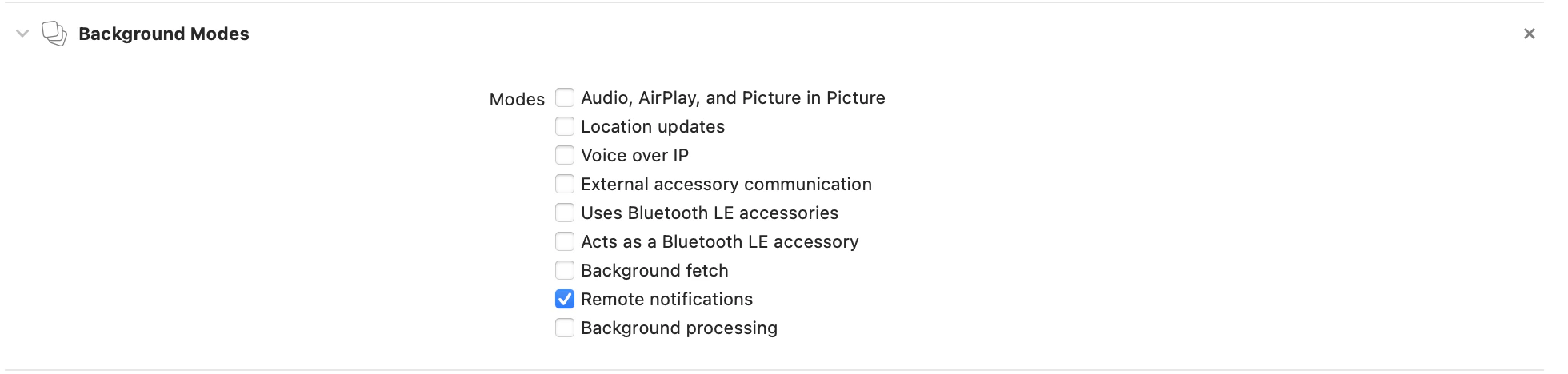
We make use of silent pushes to track uninstalls. For tracking uninstalls of all the users, enable Remote Notification background mode in-app capabilities for the same as shown below :
## Uninstall Tracking
We make use of silent pushes to track uninstalls. For tracking uninstalls of all the users, enable Remote Notification background mode in-app capabilities for the same as shown below :
 ## Push Registration
After this you will have to register for push notification by using **registerForPushNotification** method of the plugin as shown below :
```javascript JavaScript theme={null}
var moe = new MoECordova.init();
moe.registerForPushNotification();
```
Push token generated is received from `onPushTokenGenerated` callback
```javascript JavaScript theme={null}
moe.on('onPushTokenGenerated', function (payloadInfo) {
console.log('pushToken generated' + JSON.stringify(payloadInfo));
});
```
## Rich Push and Templates Support:
Please refer to the Native iOS SDK docs for supporting Rich Push(images/videos/audio in the notification) and Templates in the app:
* [Rich Push](/developer-guide/ios-sdk/push/basic/ios-push-integration-tutorial#optional)
* [Push Templates](/developer-guide/ios-sdk/push/optional/push-templates)
## Push Registration
After this you will have to register for push notification by using **registerForPushNotification** method of the plugin as shown below :
```javascript JavaScript theme={null}
var moe = new MoECordova.init();
moe.registerForPushNotification();
```
Push token generated is received from `onPushTokenGenerated` callback
```javascript JavaScript theme={null}
moe.on('onPushTokenGenerated', function (payloadInfo) {
console.log('pushToken generated' + JSON.stringify(payloadInfo));
});
```
## Rich Push and Templates Support:
Please refer to the Native iOS SDK docs for supporting Rich Push(images/videos/audio in the notification) and Templates in the app:
* [Rich Push](/developer-guide/ios-sdk/push/basic/ios-push-integration-tutorial#optional)
* [Push Templates](/developer-guide/ios-sdk/push/optional/push-templates)